Upgrading your RAM hardware is critical if your PC is lagging during heavy workloads or experiencing sudden vulnerabilities on startup. With artificial intelligence demands driving memory costs to record highs in April 2026, understanding the core differences between temporary storage and permanent boot components is essential. Resolving these memory bottlenecks guarantees peak performance and ensures long-term system stability for your desktop setup.
The Functionality and Benefits of RAM
Random Access Memory (RAM) serves as your computer's high-speed, temporary workspace. When compared directly to a traditional Hard disk drive, an SSD, or an Optical drive, RAM significantly outperforms them in both read and write speeds. Operating systems rely entirely on this component to store active data, ensuring the central processing unit (CPU) can access it instantaneously.
However, it is strictly volatile, meaning all stored information is permanently lost the moment the PC is powered off. Expanding this temporary storage delivers massive real-world benefits for daily users. Upgrading your capacity actively prevents sudden drops in computing performance by allowing multiple heavy programs to execute simultaneously.
It also improves network connections, enables much faster web browsing by accelerating page loads, and drastically increases the frame rates for video games and 3D modeling rendering tasks.
Decoding DRAM and SRAM Technologies
This temporary storage comes in two primary architectural forms, each serving a distinct purpose within the system:
- Dynamic RAM (DRAM): This is the most widely used format, typically installed directly onto the Motherboard of PCs and smartphones. It uses microscopic Capacitors and a Transistor to hold data as electrical charges, represented as a 1 (charged) or a 0 (no charge). Because these capacitors leak power naturally, the CPU or a dedicated Memory controller must constantly recharge them to prevent data loss.
- Static RAM (SRAM): Generally embedded directly inside the CPU cache, this variant utilizes complex Flip-flops and multiple Transistors to hold the 1 and 0 data states without requiring constant recharging. While significantly faster, SRAM utilizes far more transistors, making it much more expensive and limiting its physical capacity compared to DRAM.
Over the years, standard memory modules evolved from Single data rate RAM to Double data rate RAM, progressing through generations like DDR2, DDR3, and DDR4 to maximize throughput. Today, capacities routinely hit 16GB per individual stick.
The Critical Role of ROM Variations
Read-Only Memory (ROM) is entirely different; it is an embedded hardware chip containing essential, permanent data that a standard user cannot easily modify or rewrite. Even when the PC is unplugged, ROM retains its data. Historically, this hardware operated alongside a long-lasting battery inside the PC to preserve critical startup parameters.
The primary function of ROM is to house the BIOS software, which is responsible for safely initializing and booting up the computer. Beyond PCs, this technology is heavily utilized in Video game consoles, and physical media like a CD serves as a classic real-world example of write-once memory. The reprogrammability of these chips dictates their specific category:
- PROM: Programmable Read-Only Memory can only be programmed once using specific software strictly by hardware manufacturers.
- EPROM: Erasable Programmable Read-Only Memory allows the stored data to be wiped and reprogrammed using highly specific ultraviolet rays.
- EEPROM: Electrically Erasable Programmable Read-Only Memory is the modern standard found on desktop motherboards. It allows the BIOS to be easily updated or repaired electronically via software when new system patches are released.
Actionable Guide: Preparing for the 2026 EEPROM BIOS Updates
A critical cybersecurity issue emerged in April 2026 regarding expiring Microsoft Secure Boot certificates, requiring immediate user action. Older EEPROM chips that are not updated will lose security support by June 2026, exposing systems to bootkit malware. You must update your hardware using these steps:
- Verify your current hardware version by opening the terminal and running a system check to reveal the exact BIOS version.
wmic bios get smbiosbiosversion- Navigate directly to the official support page of your motherboard manufacturer to download the latest April 2026 EEPROM flashing utility.
- Install the downloaded BIOS file onto a USB flash drive, reboot your PC, and use the internal BIOS menu to apply the update electronically.
- Run Windows Update to automatically install the new UEFI CA 2023 Secure Boot certificates.
Direct Comparison: RAM vs ROM
| Feature | RAM (Random Access Memory) | ROM (Read-Only Memory) |
|---|---|---|
| Primary Use | Used by Operating systems to execute daily tasks and active programs. | Used by the BIOS to safely initialize and boot up the system. |
| Data Volatility | Volatile; loses all data immediately when power is removed. | Non-volatile; retains permanent data using a long-lasting battery. |
| Write Speed | Exceptionally fast read and write capabilities. | Extremely slow to write; typically read-only or flashed via software. |
| Storage Capacity | Massive capacity, often reaching 16GB or more per module. | Extremely small capacity, typically holding only a few megabytes. |
My Take: Navigating the 2026 Memory Hardware Crunch
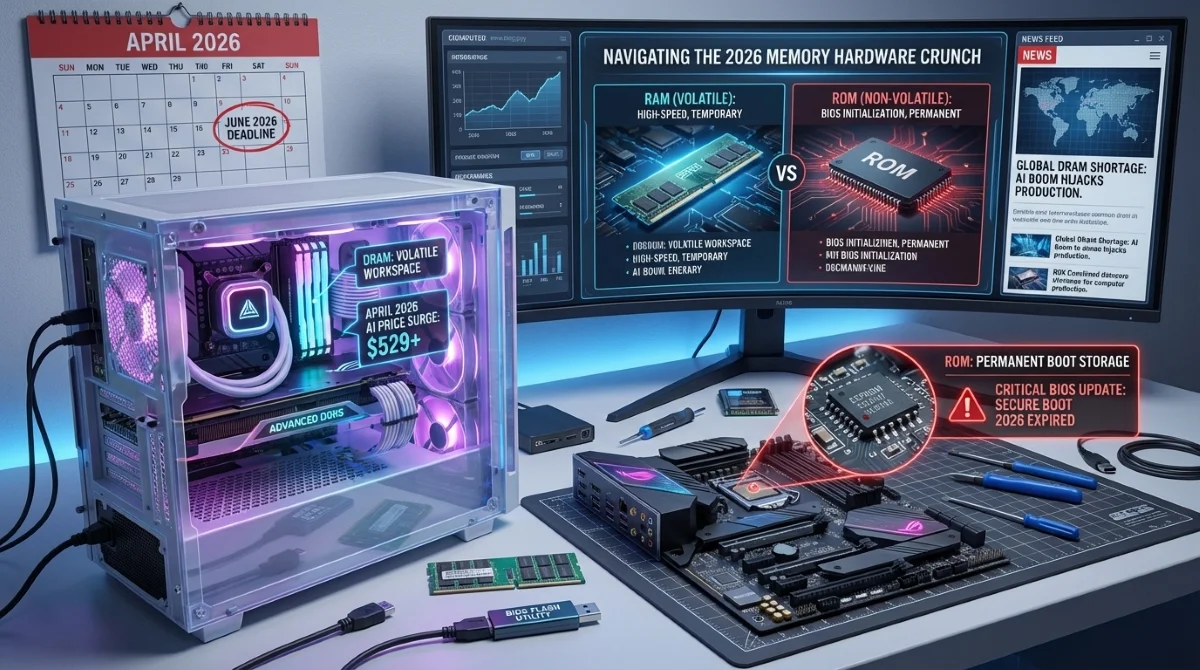
The stark hardware differences between volatile workspaces and permanent boot storage are currently taking center stage due to the massive global supply constraints affecting PC builders in April 2026. The artificial intelligence boom has completely hijacked the DRAM production lines. As data centers consume all available high-speed chips, consumer DDR5 kits have skyrocketed, with some 32GB kits jumping from under $90 to over $529.
This aggressive pricing means users must squeeze every ounce of performance out of their existing memory modules rather than casually upgrading. Simultaneously, the impending expiration of Microsoft's 2011 Secure Boot certificates by June 2026 underscores the immense importance of EEPROM technology. Users running older motherboards are currently caught in a dangerous crossfire.
They cannot afford to buy new AI-inflated hardware, but their current boards require mandatory BIOS updates to prevent catastrophic bootloader malware. Hardware longevity now depends entirely on your ability to proactively flash your ROM and optimize your existing RAM configurations before these market and security pressures peak later this year.