Microsoft is rolling out a batch of new features for the modern Windows 11 Media Player, but the update highlights a frustrating reality for users: the sleek new app is still significantly slower and heavier than its 17-year-old predecessor. For Windows 11 users tired of sluggish video loading times, this latest Insider update brings welcome bug fixes, but it also proves that returning to legacy software or open-source alternatives might still be the best option for everyday media consumption.
The update, which bumps the app to version 11.2605.14.0, was released on June 12, 2026, across the Beta (Build 26220.8680), Experimental (Build 26300.8687), and Release Preview channels. According to testing by Windows Latest, Microsoft has also introduced a dedicated release notes section for its built-in apps, signaling a renewed focus on maintaining core utilities like Calculator, Paint, and Photos. In fact, Microsoft confirmed to the publication that development on the modern Media Player never actually stopped, despite a recent drought of major feature drops.
What is New in the Latest Media Player Update
While performance remains a sticking point, the version 11.2605.14.0 update introduces several practical quality-of-life improvements for users managing large local media libraries. If you are running the latest Insider builds, here are the actionable changes you can expect:
- System-Synced Captions: Closed captions in the app are now directly tied to your system-wide Windows caption settings. Any changes to font size, color, or background in the OS will automatically apply to your videos.
- Library Indexing Transparency: When scanning a fresh media library, the app now displays an "Indexing" banner in the play queue, explaining why certain files might not be visible yet.
- Format Recognition Fixes: Microsoft has improved how the app identifies supported file types, reducing the number of false playback errors for perfectly valid media files.
- Mandatory Playlist Naming: You can no longer save a blank, unnamed playlist, preventing cluttered and unidentifiable library entries.
- Queue Stability: A crash that occurred when editing the play queue while switching between albums and playlists has been patched.
- Clearer Codec Errors: The generic "missing codec" error dialog has been rewritten to provide clearer guidance on why a file failed to play and what steps to take next.
This renewed attention to inbox apps is a positive sign, and users can now track these ongoing changes via the individual app changelog documentation on the Windows Insider Hub.
The RAM and Speed Gap: Modern vs. Legacy
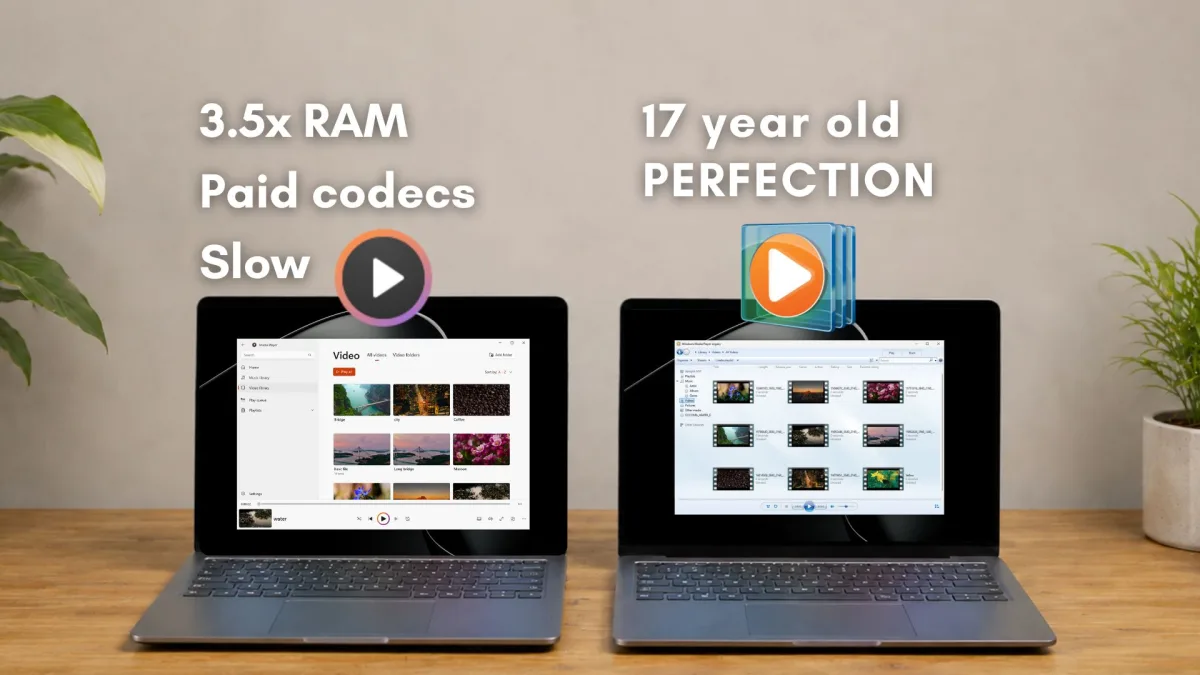
Despite the bug fixes, the modern Windows 11 Media Player struggles with basic optimization. When double-clicking a standard video file, the modern app takes several seconds to load and begin playback. In stark contrast, opening the exact same file in the open-source VLC player - or Microsoft's own Legacy Windows Media Player from 2009 - results in instant playback.
The resource consumption is equally disproportionate. Testing reveals that the modern Media Player consumes around 377 MB of RAM while sitting completely idle. Meanwhile, the Legacy Windows Media Player uses just 103.4 MB in the exact same state. This mirrors a broader trend in modern Windows development; for example, the new web-based Outlook app can take up to 10 seconds to open an email from a notification, a task Outlook Classic handles in under a second.
The $0.99 HEVC Codec Paywall
Beyond raw speed, the modern app suffers from a significant codec gap, most notably with HEVC (H.265). HEVC is the default video format for modern iPhones and flagship Android devices. However, if you transfer a video from your phone to a fresh Windows 11 laptop, the modern Media Player cannot play it out of the box. Instead, users are prompted to buy the HEVC Video Extensions from the Microsoft Store for $0.99.
The irony is that the Legacy Windows Media Player - built decades before the HEVC codec was even invented - can still play these files without issue, as can free alternatives like VLC and MPV. While Microsoft must pay royalties to HEVC patent holders like Apple and Samsung, passing this cost onto users for a universally standard video format creates a jarring out-of-the-box experience.
The Native App Dilemma Microsoft Must Solve
Microsoft is currently pushing WinUI as its permanent native UI framework for Windows 11, urging developers to build fast, 100% native applications. However, it is difficult to convince third-party developers to prioritize performance when Microsoft's own built-in media player fails to lead by example. A modern app should not be three times heavier and noticeably slower than software that shipped with Windows 7.
The HEVC paywall further complicates the user experience. Asking a consumer who just purchased a premium Windows laptop to pull out their credit card for a $0.99 extension simply to watch a video they recorded on their phone is a fundamental failure in user friction. Until Microsoft absorbs that licensing cost and optimizes the WinUI framework to match the instant launch speeds of legacy code, power users will continue to bypass the modern Windows 11 Media Player in favor of lightweight, fully-equipped alternatives like VLC.