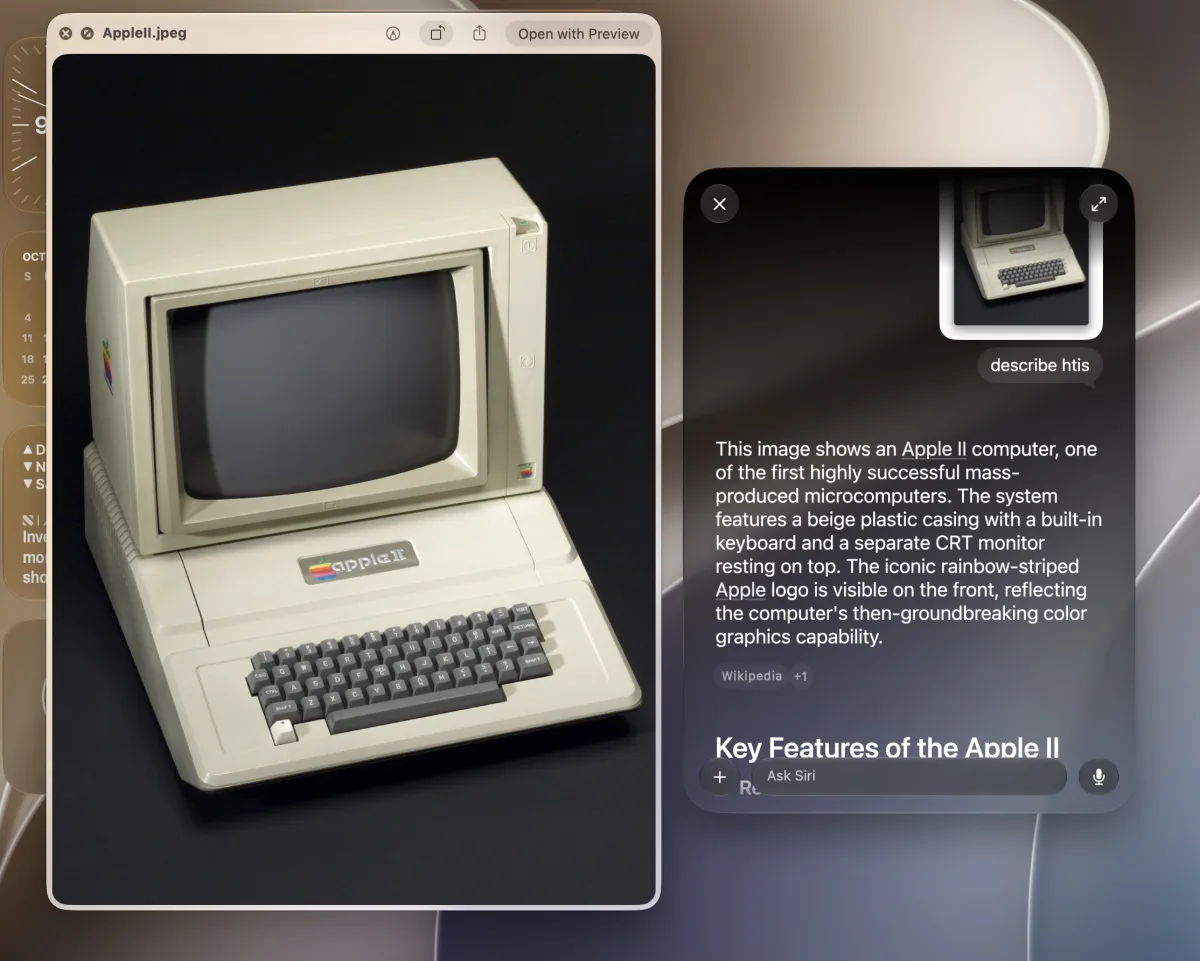
Visual Intelligence in MacOS 27 Golden Gate lets Mac users query Siri about almost anything visible on their screen using a single keyboard shortcut. According to a guide from OS X Daily, the AI feature set can help identify objects in photos, explain documents, or clarify the purpose of unfamiliar apps and files.
Accessing the Siri and Visual Intelligence shortcut requires a Mac running MacOS 27 Golden Gate or a newer version.
How to Use Visual Intelligence and Ask Siri on Any Active Window
OS X Daily notes that triggering the tool takes two steps:
- Keep the image, file, or item you want to ask about open as the active window on the Mac.
- Press Shift + Command + Spacebar to launch the Ask Siri prompt with Visual Intelligence for that active window, then type your question and press Return. This brings up a small query box where you can type a request about the active window.
The Ask Siri shortcut works from almost anywhere on the Mac and acts much like the floating Write with Siri button shown inside text-entry fields in recent MacOS releases.
What You Can Identify on Screen
Once the prompt appears, users can ask specific questions about whatever is open. For instance, with a photo of a plant in the active window, pressing Shift + Command + Spacebar and typing “what type of plant is this” prompts Siri and Visual Intelligence to label and describe the plant.
Users can also press Command + Shift + Spacebar and type “describe this” to have the tool identify an on-screen image. In OS X Daily's testing, the feature accurately recognized a photo of an Apple II computer and returned details about it.
The shortcut also works inside Finder when inspecting an unfamiliar app, file, or system component. By pressing Command + Shift + Spacebar and asking “what is this”, OS X Daily used the tool to accurately identify a system daemon inside a MacOS system folder.
According to OS X Daily's writer, Siri and Apple Intelligence accurately described every test example provided, returning useful and accurate information across photos, webpages, files, and other items. As an alternative, the outlet notes that Spotlight's Ask ChatGPT feature can perform similar tasks when given an image.
This article was written by AI from reporting by osxdaily.com.