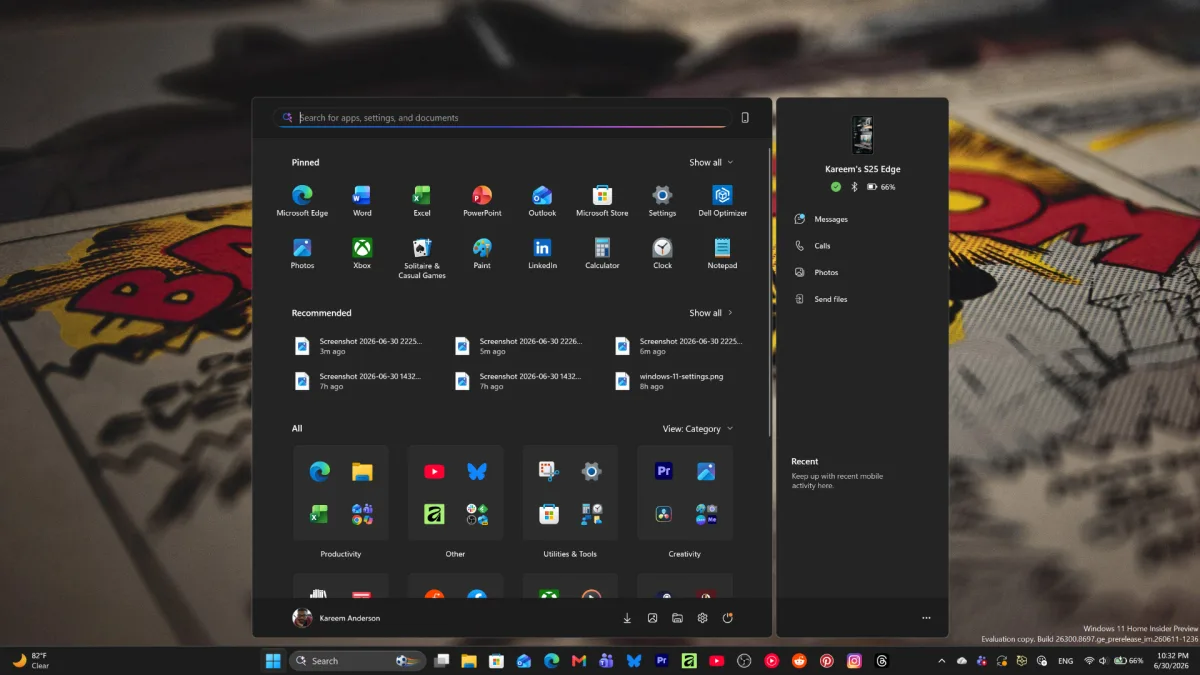
Microsoft is officially rolling out its highly anticipated Windows 11 Start menu update to all users on versions 24H2 and 25H2, addressing years of feedback regarding clutter and rigidity. This release introduces a scrollable single-page layout, a category view for All Apps, and the ability to hide the controversial Recommended section. Meanwhile, the company is quietly laying the groundwork for a massive performance-focused overhaul coming later in 2026.
This update is a major win for both everyday power users tired of rigid layouts and IT administrators who need precise control over enterprise fleets. By decoupling the Start menu's components into toggleable modules, Microsoft is finally moving away from a fixed design philosophy toward a truly adaptable interface. It allows the menu to adjust its footprint based entirely on user preference.
Enterprise Control Shifts to JSON
While average users will manage these changes through standard settings, the underlying architecture has been completely revamped for enterprise environments. Microsoft has transitioned away from the older XML-based layout definitions in favor of a more robust JSON configuration format.
For IT administrators, this latest rollout represents a major improvement in consistency. By leveraging Group Policy (GPO) or Configuration Service Providers (CSP), admins can now push highly specific, reliable Start layouts across a managed fleet of devices. This ensures that frontline workers or kiosk devices have an interface tailored exactly to their workflows, preventing accidental access to unnecessary tools.
How to Customize Your New Start Menu
Whether you are a regular user looking to clean up your desktop or an IT admin deploying policies, you can adjust the new modular layout using the following steps.
For Regular Users:
- Open Settings: Hit the Windows Key and navigate to Settings > Personalization > Start.
- Adjust Toggles: Customize the layout to your liking by toggling sections such as "Recent" or "Recently added apps."
For IT Admins:
- Apply Policies: Open the Local Group Policy Editor (gpedit.msc) and navigate to User Configuration > Administrative Templates > Start Menu and Taskbar.
- Enforce and Refresh: After setting your JSON-based preferences, open Command Prompt with administrator privileges and run the following command to apply the policies immediately:
gpupdate /forceClose and reopen the Start menu to verify the new layout. Ensure your JSON file is properly referenced in the policy path to prevent the menu from reverting to a blank state.
What to Expect in the Windows 11 26H2 Update
The next wave of Start menu changes goes considerably further and is currently being tested in Experimental Insider build 26300.8553, which was released on May 29, 2026. These features are expected to reach general availability with the 26H2 update later this year.
- New Resize Options: The fixed size is being replaced with Small and Large presets. The Large layout displays more columns of pinned apps, while the Small layout is optimized for lower-resolution screens.
- Advanced Visibility Toggles: Users will be able to independently hide the Pinned section, the All Apps list, and the Recent section. If all sections are disabled, a clean 'All Start menu sections are off' message appears.
- Privacy Enhancements: The new build allows users to hide their account name and profile picture, which is highly useful during screen sharing or professional presentations.
Fixing the Sluggishness: WinUI and CPU Boosts
Beyond visual customization, Microsoft is actively addressing the Start menu's notorious performance issues. The Low Latency Profile CPU boost, which prioritizes the Start menu engine to reduce micro-stutters, arrived with the May 2026 optional update KB5089573 and is now rolling out broadly with the June 2026 Patch Tuesday release.
However, the long-term fix is much more significant. As announced at Build 2026, Microsoft is rebuilding the Start menu using native WinUI frameworks. This will permanently replace the current web-based components that have historically caused sluggish open times, particularly on lower-end hardware.
The Death of the Web-Based Start Menu
The transition to a native WinUI Start menu is arguably the most important technical shift in Windows 11 this year. The web-based Start menu was a remnant of the canceled Windows 10X project, and its reliance on web technologies is what caused the frustrating micro-stutters that users have complained about since 2021.
By rebuilding this core OS component natively and giving enterprise admins strict JSON control, Microsoft is acknowledging that essential desktop interfaces demand bare-metal performance, not web wrappers. This architectural pivot not only guarantees a faster, more responsive Start menu for the 26H2 release, but it also sets a promising precedent that other sluggish, web-reliant UI elements in Windows 11 might finally get the native rewrites they desperately need.
This article was written by AI from reporting by windowslatest.com.