For power users, multitasking on a standard slab smartphone often feels like a frustrating bottleneck. Constantly relying on the recent apps menu - closing one app, scrolling through a carousel, and opening another - breaks focus and slows down productivity. This friction becomes especially obvious for anyone who has experienced the seamless, side-by-side app management of foldable devices.
However, the latest Android 17 beta is fundamentally changing how users interact with standard displays. By introducing a refined app bubbles feature, Google is addressing one of the most persistent complaints about traditional smartphone workflows. Tested on the Google Pixel 10a, this update replaces the clunky app-switching rhythm with an instant, floating-window experience.
Bringing Foldable Multitasking to Slab Phones
The transition from a large-screen foldable, like the Samsung Galaxy Z Fold 7, back to a standard device usually highlights the limitations of a single, narrow display. The traditional method of digging through an app drawer or swiping through recent apps feels archaic by comparison. Android 17 app bubbles (App Bubbles) eliminate this friction entirely.
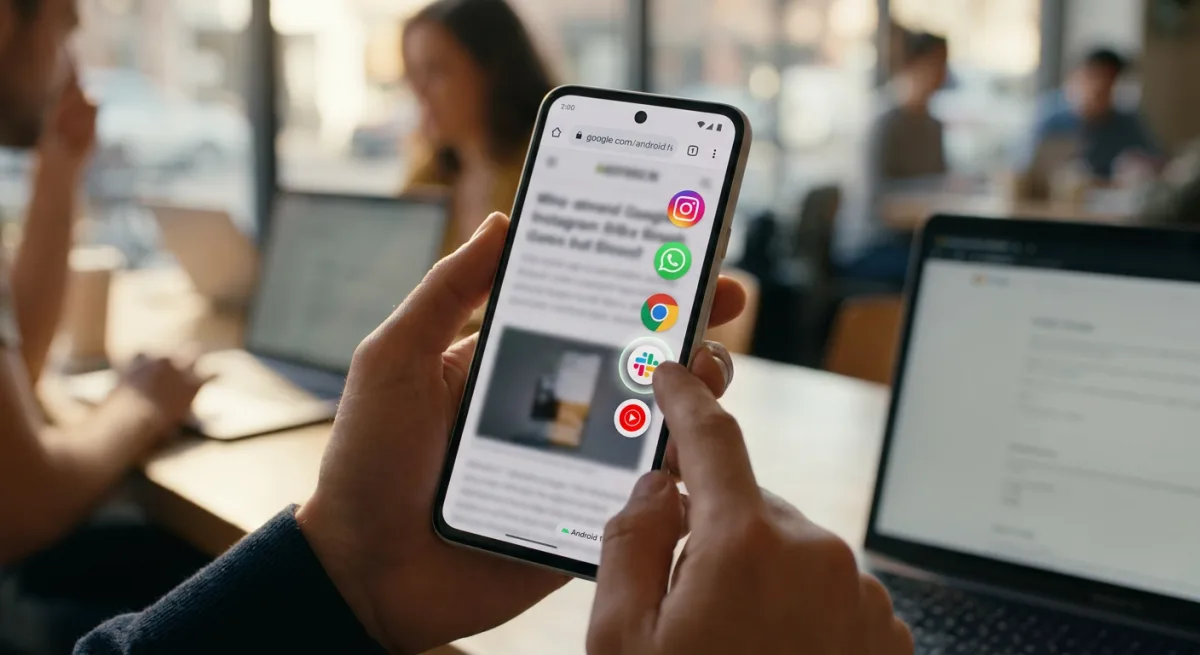
By pinning frequently used applications to the edge of the screen, users can tap a bubble to instantly jump into an app, swipe to another, and maintain their workflow without interruption. Despite initial concerns that floating windows might feel cramped on a device like the Pixel 10a, the implementation is surprisingly intuitive. It effectively delivers a slice of foldable-style multitasking to a conventional form factor, making tasks like quick replies and cross-app copying significantly faster.
How the 5-App Limit Boosts Productivity
To prevent the interface from devolving into a chaotic mess of overlapping windows, Android 17 restricts users to pinning a maximum of five apps at a time. This deliberate limitation forces users to curate their digital workspace, striking a balance between accessibility and screen real estate.
For a balanced daily routine, a typical five-bubble setup might include a mix of work and personal tools. For example, keeping Instagram, WhatsApp, Chrome, Slack, and YouTube Music pinned allows for instant access to both critical communications and casual distractions. Slack messages can be checked and dismissed in seconds, while Chrome remains on standby for quick searches.
The best part of Android 17’s bubbles feature is not just that it lets me multitask across multiple apps on a regular slab phone - it’s that it somehow manages to do everything without making me feel overwhelmed.
- Android Authority
This setup proves highly adaptable. While some users might mix social media with work, productivity-focused individuals can dedicate all five slots to enterprise apps like Gmail, Google Docs, and Slack, creating a relentless multitasking engine.
The Software Strategy Behind the Screen
The introduction of refined app bubbles in Android 17 signals a crucial shift in Google's broader ecosystem strategy. As hardware innovation on standard slab phones begins to plateau, the battleground for user retention has firmly moved to the software layer. By bringing foldable-tier multitasking capabilities to devices like the Pixel 10a, Google is actively closing the productivity gap between its entry-level and premium hardware.
This move also acknowledges a fundamental change in consumer behavior: users are no longer just consuming content; they are constantly context-switching between work, social, and utility apps. By reducing the cognitive load required to switch tasks, Android 17 isn't just adding a cosmetic feature - it is fundamentally redefining the baseline expectations for mobile operating systems. If this beta feature makes it to the final release unchanged, it could force competitors to rethink their own approach to single-screen multitasking.
This article was written by AI from reporting by androidauthority.com.