Best Apps

41 articles

In-depth evaluations and comparative audits of top-tier desktop applications, mobile tools, and creative digital utilities designed to elevate operational efficiency. We compare feature sets, interface ergonomics, and pricing structures to help users curate the optimal software stack.

Advertisement
How to install and use the Amazon Windows 8 app

How to install and use the Amazon Windows 8 app

The official shopping application allows users to browse products and manage their carts directly from a Metro interface. However, availability in the Microsoft Store is no longer guaranteed for all regions and devices....

Lotus Flow App Review: Why This Wellness Hub Beats Single-Purpose Yoga Apps

Lotus Flow App Review: Why This Wellness Hub Beats Single-Purpose Yoga Apps

Lotus Flow combines everything from Wall Pilates to Tai Chi into a single platform, eliminating the need for multiple fitness subscriptions. The app builds personalized daily routines based on your goals, offering sessions that range from quick 10-minute stretches to full 45-minute workouts....

Advertisement
Run Full Linux VMs and Docker on Android Without Root: Podroid v1.2.9 Released

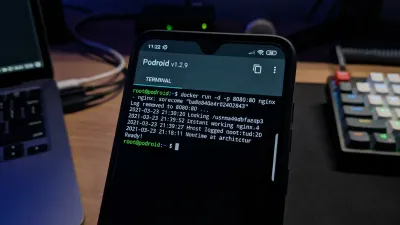
Run Full Linux VMs and Docker on Android Without Root: Podroid v1.2.9 Released

The new Podroid v1.2.9 update allows developers to run a native Alpine Linux VM directly on Android 8+ devices without root access. By leveraging hardware-accelerated AVF, it transforms standard smartphones into legitimate edge-computing nodes capable of running full X11 desktop apps....

Why App Behavioral Data Beats User Feedback in Product Development

Why App Behavioral Data Beats User Feedback in Product Development

InList discovered its concerning retention numbers weren't a flaw, but a sign users simply needed the service less frequently than assumed. Watching silent usability sessions for 20 minutes reveals more genuine app behavioral data than a week of survey feedback....

Google Gemini Finally Gets a Dedicated Windows App with Floating Overlay

Google Gemini Finally Gets a Dedicated Windows App with Floating Overlay

The new standalone application requires just 8GB of RAM and 200MB of disk space to run on both x86 and Arm architectures. By using the Alt + Space shortcut, users can summon a floating overlay to generate images with Nano Banana without disrupting their workflow....

Advertisement