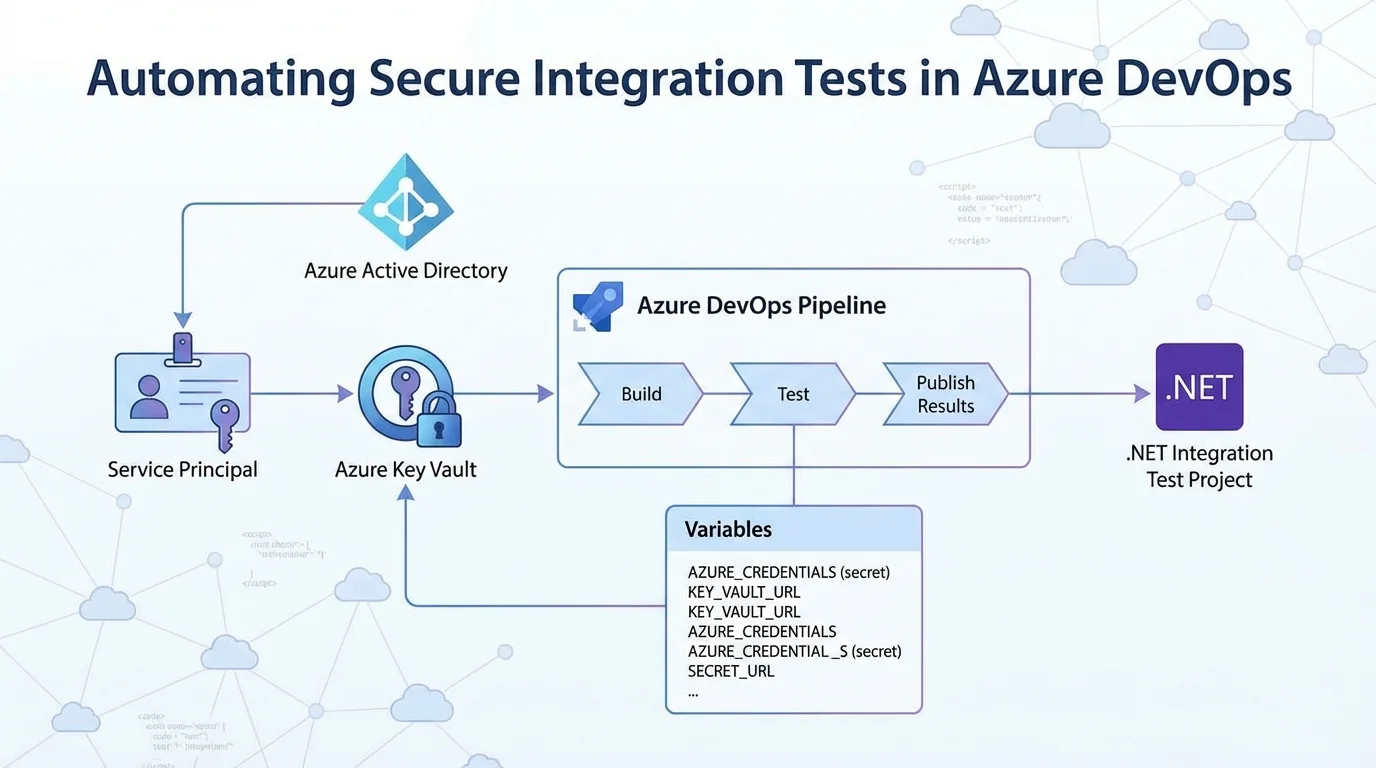
Automating integration tests for secure APIs often hits a wall when handling credentials in continuous integration pipelines. For development teams relying on Microsoft's ecosystem, transitioning these tests from local environments to Azure DevOps requires a secure method for injecting authentication details. By leveraging Azure Key Vault and service principals, developers can securely authenticate and run tests against Azure AD-protected APIs without hardcoding sensitive data into their repositories.
This workflow builds upon previous methods used in GitHub Actions, adapting the YAML configuration for Azure Pipelines. The core challenge remains the same: the tests are no longer executing on a local developer machine, meaning user-based authentication must be replaced with robust application credentials. This guide breaks down the exact steps required to configure the pipeline, provision the necessary access, and execute the tests automatically.
How to Create the Azure AD Service Principal
To allow the pipeline to authenticate, you must first generate application credentials using the cross-platform Azure CLI. These credentials will grant the automated tests access to the Azure Key Vault, which houses the necessary user and app secrets.
Begin by logging into your Azure account and setting the default subscription that contains your Key Vault:
az loginaz account set -s "id-of-subscription"Next, create the Azure AD service principal. It is highly recommended to assign a descriptive name to easily identify its purpose later. The following command generates the principal without assigning a default Role-Based Access Control (RBAC) role, as it is unnecessary for this specific workflow:
az ad sp create-for-rbac -n "AzurePipelinesAADTestingDemo" --sdk-auth --skip-assignmentExecuting this command will output a JSON object containing the new credentials. You must save this output, as it will be required when configuring the pipeline variables later:
{
  "clientId": "",
  "clientSecret": "",
  "subscriptionId": "",
  "tenantId": "",
  "activeDirectoryEndpointUrl": "https://login.microsoftonline.com",
  "resourceManagerEndpointUrl": "https://management.azure.com/",
  "activeDirectoryGraphResourceId": "https://graph.windows.net/",
  "sqlManagementEndpointUrl": "https://management.core.windows.net:8443/",
  "galleryEndpointUrl": "https://gallery.azure.com/",
  "managementEndpointUrl": "https://management.core.windows.net/"
}
Granting Key Vault Access
With the service principal created, it now requires explicit permission to read secrets from your Azure Key Vault. You will need the clientId value from the JSON output generated in the previous step.
Run the following command to grant the service principal read access to all secrets within the specified Key Vault:
az keyvault set-policy -n "key-vault-name" --secret-permissions get list --spn "clientId-from-previous-output"Configuring the.NET Project for Pipeline Credentials
The test project must be modified to accept the credentials passed down from the Azure DevOps pipeline. Specifically, the application needs to look for an environment variable named AZURE_CREDENTIALS.
If this variable is absent, the application assumes it is running locally and defaults to local user authentication. If the variable is present, it deserializes the JSON object to extract the client ID and secret. Update your configuration builder as follows:
builder.ConfigureAppConfiguration(configBuilder =>
{
    // Adds user secrets for the integration test project
    configBuilder.AddUserSecrets();

    // Build temporary config, get Key Vault URL, add Key Vault as config source
    var config = configBuilder.Build();
    string keyVaultUrl = config["IntegrationTest:KeyVaultUrl"];
    if (!string.IsNullOrEmpty(keyVaultUrl))
    {
        // CI / CD pipeline sets up a credentials environment variable to use
        string credentialsJson = Environment.GetEnvironmentVariable("AZURE_CREDENTIALS");
        // If it is not present, we are running locally
        if (string.IsNullOrEmpty(credentialsJson))
        {
            // Use local user authentication
            configBuilder.AddAzureKeyVault(keyVaultUrl);
        }
        else
        {
            // Use credentials in JSON object
            var credentials = (JObject)JsonConvert.DeserializeObject(credentialsJson);
            string clientId = credentials?.Value("clientId");
            string clientSecret = credentials?.Value("clientSecret");
            configBuilder.AddAzureKeyVault(keyVaultUrl, clientId, clientSecret);
        }

        config = configBuilder.Build();
    }

    Settings = config.GetSection("IntegrationTest").Get();
});
Setting Up Azure DevOps Pipeline Variables
Navigate to your Azure DevOps project and create a new pipeline. Before defining the YAML steps, you must configure the necessary environment variables. Click on the Variables section in the top right corner of the pipeline editor and add the following six variables:
- AZURE_CREDENTIALS: The complete JSON output generated by the service principal creation command. This must be marked as a secret.
- API_APP_ID_URI: The application ID URI for the API app registration within your test Azure AD tenant.
- API_CLIENT_ID: The client ID for the API app registration.
- API_AUTHORITY: The identifier for the Azure AD tenant that the API will accept tokens for.
- API_AUTHORIZATION_URL: The authorization endpoint URL used in the Swagger UI (useful for maintaining consistent app configuration).
- KEY_VAULT_URL: The base URL for the Azure Key Vault containing your credentials.
Building the YAML Pipeline
The final step is constructing the YAML definition to execute the build and run the tests. The pipeline is configured to trigger on new commits to the master branch and utilizes the latest Ubuntu Linux agent.
The workflow ensures the correct.NET Core SDK is installed, builds the solution, and runs the tests while injecting the previously defined variables. The addition of the --logger trx flag allows Azure DevOps to natively parse and publish the test results.
trigger:
  - master

pool:
  vmImage: "ubuntu-latest"

steps:
  - task: UseDotNet@2
    displayName: Setup .NET Core
    inputs:
      packageType: "sdk"
      version: "3.1.x"

  - script: dotnet build --configuration Release
    displayName: Build with dotnet

  - script: dotnet test --configuration Release --logger trx
    displayName: Test with dotnet
    workingDirectory: Joonasw.AadTestingDemo.IntegrationTests
    env:
      IntegrationTest__KeyVaultUrl: $(KEY_VAULT_URL)
      Authentication__Authority: $(API_AUTHORITY)
      Authentication__AuthorizationUrl: $(API_AUTHORIZATION_URL)
      Authentication__ClientId: $(API_CLIENT_ID)
      Authentication__ApplicationIdUri: $(API_APP_ID_URI)
      AZURE_CREDENTIALS: $(AZURE_CREDENTIALS)

  - task: PublishTestResults@2
    displayName: Publish test results
    condition: succeededOrFailed()
    inputs:
      testRunner: VSTest
      testResultsFiles: "**/*.trx"
My Take
Migrating integration tests from local environments to a robust CI/CD platform like Azure DevOps is a critical maturity milestone for any enterprise development team. The approach outlined here - using a dedicated service principal to fetch secrets dynamically from Azure Key Vault - represents the gold standard for DevSecOps. It entirely eliminates the risk of hardcoded credentials leaking into source control, which remains one of the most common vectors for enterprise data breaches.
However, the operational reality of this setup requires strict lifecycle management. As noted in the workflow, service principal credentials and user tokens inherently expire. Teams implementing this pipeline must establish automated alerts or calendar reminders to rotate these secrets before they lapse. A pipeline failure due to an expired Key Vault secret can halt deployment pipelines entirely, causing unnecessary bottlenecks during critical release windows.
Ultimately, while the YAML syntax differs slightly from GitHub Actions, the underlying architectural philosophy is identical. Microsoft's unified approach across both platforms ensures that teams can port their security practices seamlessly. For organizations heavily invested in the Azure ecosystem, centralizing these automated tests within Azure Pipelines provides superior visibility and tighter integration with their existing enterprise identity management.