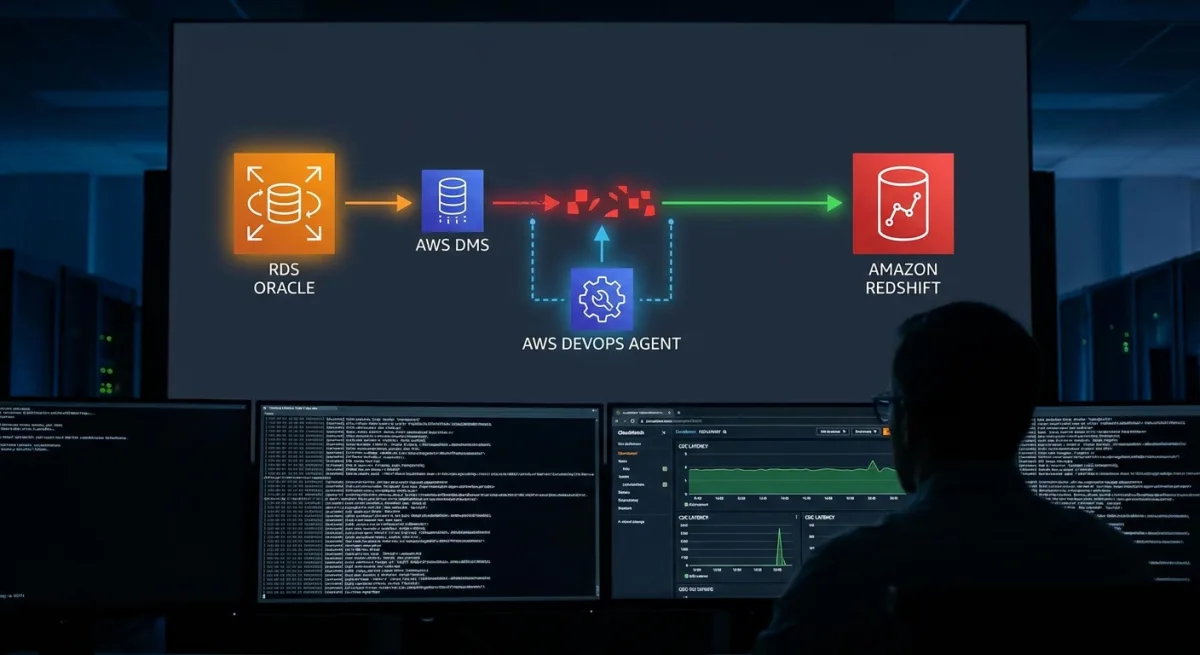
Database migrations from Amazon RDS for Oracle to Amazon Redshift using the AWS Database Migration Service (AWS DMS) are highly effective, but diagnosing replication failures can be a grueling process. When change data capture (CDC) latency spikes, engineers often waste hours correlating logs across different AWS services to find the root cause. By integrating the AWS DevOps Agent, teams can automate this root cause analysis and receive actionable remediation steps in minutes.
This guide explains how to configure an automated troubleshooting pipeline using Amazon CloudWatch, Amazon EventBridge, and AWS Lambda. By setting up this architecture, your system will autonomously triage incidents 24/7 based on correlated metrics, logs, and application topology.
Prerequisites for Automated Troubleshooting
Before configuring the automated pipeline, ensure your environment meets the following baseline requirements.
- An active AWS DevOps Agent Space configured with access to the AWS accounts containing your DMS resources.
- An AWS DMS replication instance with source Amazon RDS for Oracle and target Amazon Redshift endpoints fully configured.
- An active AWS DMS replication task with CloudWatch logging enabled for all log components.
- An AWS Lambda execution role with permissions to read from AWS Secrets Manager and be invoked by Amazon EventBridge.
- Appropriate IAM permissions for the DevOps Agent to access DMS, CloudWatch, and Amazon Redshift resources using the principle of least privilege.
Configuring CloudWatch Alarms for DMS Metrics
CloudWatch alarms on key DMS metrics provide operational visibility and automatically publish state change events to Amazon EventBridge. These events will trigger the automated investigations via a Lambda function.
Make sure the ReplicationTaskIdentifier references an actively running task. If you stop or decommission a task, disable or delete its alarms to avoid false positives.
- Configure the CDC source latency alarm. This monitors how far behind DMS is in reading changes from the Oracle redo logs, firing if it falls more than two minutes behind for one straight minute.
{
  "AlarmName": "dms-cdc-latency-source-breached-alarm",
  "Namespace": "AWS/DMS",
  "MetricName": "CDCLatencySource",
  "Dimensions": [
    {
      "Name": "ReplicationInstanceIdentifier",
      "Value": "your-replication-instance-id"
    },
    {
      "Name": "ReplicationTaskIdentifier",
      "Value": "your-task-id"
    }
  ],
  "Statistic": "Average",
  "Period": 30,
  "EvaluationPeriods": 2,
  "DatapointsToAlarm": 2,
  "Threshold": 120,
  "ComparisonOperator": "GreaterThanThreshold",
  "TreatMissingData": "breaching"
}- Set up the CDC target latency alarm. This measures how far behind DMS is in applying captured changes to Amazon Redshift, triggering if latency exceeds 30 seconds for 20 consecutive seconds.
{
  "AlarmName": "dms-cdc-latency-target-breached-alarm",
  "Namespace": "AWS/DMS",
  "MetricName": "CDCLatencyTarget",
  "Dimensions": [
    {
      "Name": "ReplicationInstanceIdentifier",
      "Value": "your-replication-instance-id"
    },
    {
      "Name": "ReplicationTaskIdentifier",
      "Value": "your-task-id"
    }
  ],
  "Statistic": "Average",
  "Period": 10,
  "EvaluationPeriods": 2,
  "DatapointsToAlarm": 2,
  "Threshold": 30,
  "ComparisonOperator": "GreaterThanThreshold",
  "TreatMissingData": "breaching"
}
Setting Up the AWS DevOps Agent Pipeline
Follow these steps to link your monitoring alarms to the autonomous troubleshooting agent.
- Create a DevOps Agent Space in the AWS console. This establishes the centralized environment for monitoring your AWS accounts and DMS resources.
- Generate a DevOps Agent webhook from the Capabilities tab. This creates an HMAC key pair (WEBHOOK_URL and WEBHOOK_SECRET) that must be securely stored in AWS Secrets Manager for later use.
- Deploy a Lambda function to start the investigation. This function will receive events from Amazon EventBridge and call the DevOps Agent webhook to initiate the triage process.
- Create an EventBridge rule targeting the Lambda function. This acts as the primary trigger, firing whenever any of your DMS CloudWatch alarms enter the ALARM state.
{
  "source": ["aws.cloudwatch"],
  "detail-type": ["CloudWatch Alarm State Change"],
  "detail": {
    "state": {
      "value": ["ALARM"]
    },
    "alarmName": [{
      "prefix": "dms-"
    }]
  }
}- Test the investigation flow by temporarily lowering an alarm threshold. This ensures that the EventBridge routing and Lambda invocation successfully trigger the DevOps Agent.
Real-World Scenarios and Proactive Prevention
Once configured, the DevOps Agent autonomously investigates issues just like an experienced engineer. If CDC source latency grows, the agent analyzes Oracle metrics to identify heavy write workloads or undersized redo log groups. It quantifies the CDC backlog and rules out downstream bottlenecks automatically.
Similarly, if CDC target latency spikes on Amazon Redshift, the agent correlates source activity with target performance. It can pinpoint configuration gaps, such as single-threaded apply settings failing to keep pace with incoming changes, and recommend enabling parallel apply threads.
Beyond reactive troubleshooting, the agent provides proactive recommendations. It may suggest adding alarms for specific memory metrics or upgrading your replication instance type to provide adequate headroom for peak workloads. Note that the DevOps Agent is currently limited to six AWS regions, and CloudWatch log retention must be set to at least seven days to ensure accurate historical analysis.
The Shift Toward Autonomous Cloud Operations
The integration of the AWS DevOps Agent into database migration workflows represents a critical evolution in cloud infrastructure management. By automating the correlation of telemetry data across Oracle, AWS DMS, and Amazon Redshift, AWS is effectively reducing the mean time to resolution (MTTR) from hours to mere minutes. This shift allows engineering teams to focus on architecture rather than getting bogged down in log analysis.
However, while Agentic AI excels at identifying infrastructure bottlenecks and configuration gaps, it still lacks visibility into application-level code or complex business logic. Organizations must treat the DevOps Agent as a powerful triage assistant rather than a complete replacement for deep database expertise. As these autonomous tools expand to more regions, early adopters who integrate them into their EventBridge pipelines will gain a significant operational advantage.