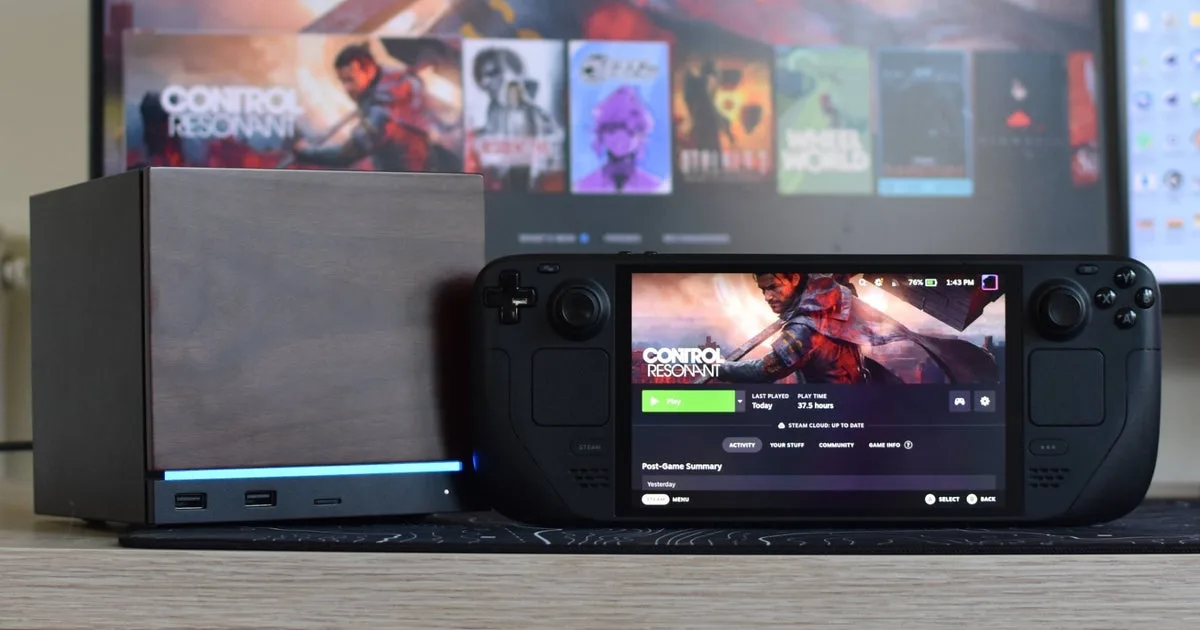
PC gamers hoping to play Remedy's new anomalous New York action game on the go are in for a rough ride, as Control Resonant struggles to maintain playable framerates on the Steam Deck. Despite featuring a dedicated "Handheld" graphics preset, Valve's portable PC buckles under the game's heavy visual demands, making the beefier Steam Machine the only viable SteamOS alternative. This performance breakdown is essential for handheld enthusiasts who need to know whether to allocate 105GB of SSD space to the game, and how to configure it for stable gameplay on capable hardware.
On the Steam Deck OLED, the experience is severely compromised. Even when utilizing the Handheld preset alongside FSR upscaling set to its fast Performance mode, the game barely brushes 30fps. Navigating the warped streets of Manhattan typically results in framerates hovering in the low-to-mid twenties. The performance is further marred by frequent, heavy stutters, which are likely caused by the handheld running out of its 16GB of combined RAM and VRAM. Pushing the upscaler to Ultra Performance only degrades the visual clarity to a point where the game's timing-sensitive combat becomes unplayable.
Disabling additional post-processing effects like Screen Space Ambient Occlusion (SSAO) and motion blur fails to push the average framerate past 25fps in open areas. While indoor environments and late-game sections can occasionally reach 45fps, the sheer amount of sub-30fps sludge makes the Steam Deck an unviable platform for this specific title.
Optimizing for the Steam Machine
The Steam Machine handles the game significantly better, largely because its 16GB of system RAM is separate from its dedicated video memory. At a native 1080p resolution with the Medium quality preset, the system delivers a playable 40-50fps in the most demanding open-world regions. Bumping the preset to High drops the framerate to the 35-45fps range, but enabling FSR Quality upscaling pushes the performance to a much smoother 50-65fps.
To squeeze out a 14% performance improvement over the standard High preset and achieve peaks above 70fps on a 60Hz or faster gaming monitor, players should apply the following custom configuration. Note that Control Resonant is highly demanding, and lowering most settings beyond this point yields minimal framerate gains:
- Render resolution: Quality
- Upscaler: FSR
- FSR Sharpness: 50
- Texture resolution: Ultra
- Texture filtering: High
- Level of detail (LOD): High
- Global illumination: High
- Volumetric lighting: Medium
- Volumetric spotlight: High
- Fog: High
- Shadow map resolution: High
- Shadow map filtering: High
- Shadow map detail: High
- Screen space ambient occlusion: On
- Screen space reflections (SSR): Medium
- Signed Distance Field (SDF) reflections: Off
- Ray tracing preset: Off
- Post processing resolution: Render resolution
- Motion blur: Off
- Depth of field: On
- Lens distortion: On
- Film grain: On
- Vignetting: On
Players should strictly avoid enabling Ray Tracing on SteamOS hardware. Activating the feature immediately forces a rare crash, requiring a switch to the Proton Experimental branch just to launch the game again. Even on the Low RT preset, framerates plummet back into the unplayable twenties. Conversely, FSR Frame Generation is a viable option that can push the game past 100fps with surprisingly smooth visual results, though it does introduce a slight input lag that may interfere with the game's fast-paced melee combat.
The Shared Memory Bottleneck
The stark performance gap between the Steam Deck and the Steam Machine in Control Resonant highlights a growing architectural wall for Valve's handheld. The Deck's unified 16GB memory pool - shared between system RAM and VRAM - is no longer sufficient for modern, geometry-heavy titles that stream massive assets in real-time. While the Steam Machine survives this test purely by having separate memory pools, the Deck's heavy stuttering indicates it is constantly swapping data, choking the APU.
This signals a critical shift for portable PC gaming. Developers including a "Handheld" preset is no longer a guarantee of playability; it is merely a baseline attempt. As studios continue to push dense, anomalous environments with complex lighting, the original Steam Deck hardware will increasingly be relegated to indie titles and older AAA games, forcing players to rely on cloud streaming or heavier desktop hardware for the latest releases.