Valve has officially launched the Steam Workshop Beta, delivering a massive UI overhaul designed to make mod browsing significantly faster and fully optimized for the Steam Deck and mobile devices. For PC gamers and heavy modders, this update eliminates the clunky navigation of the legacy interface, allowing for seamless mod management directly from handhelds or Big Picture mode. The redesign focuses on expanding visibility and reducing the friction of finding community-created content.
This overhaul is part of Valve's broader initiative to modernize the Steam ecosystem, following closely on the heels of the recent Remote Downloads Management feature and the Steam store home page refresh. By rewriting the underlying page architecture, Valve has drastically improved responsiveness across all display contexts. According to the official Valve announcement, the development team plans to keep the interface in testing for a few weeks or months to gather community feedback before rolling it out globally to other Workshop pages.
Key Features in the Workshop Overhaul
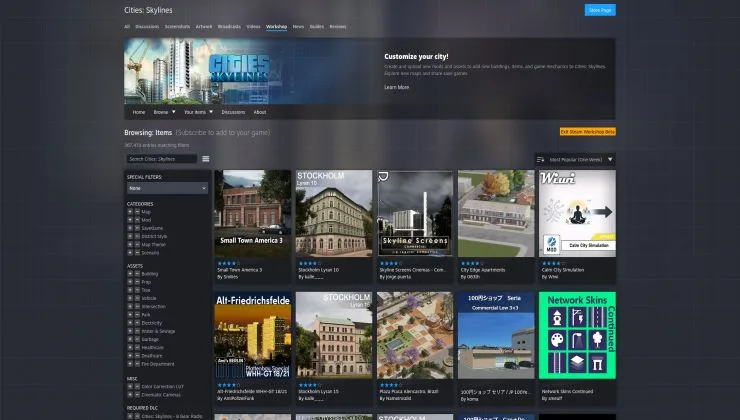
- Wider Layout and Larger Previews: The browsing page now utilizes a wider footprint, displaying more items simultaneously with larger preview images.
- Accelerated and Smart Filtering: The page rewrite ensures near-instant updates when applying filters or changing sort orders. Furthermore, game developers can now configure smart, per-section filtering - for example, separating filters explicitly for Maps versus Items.
- New Quick View Mode: Users can click a magnifying glass icon on any item to open a quick view overlay. This allows players to view screenshots, favorite, subscribe, or vote on a mod without ever leaving the main browsing page.
- Cross-Platform Responsiveness: The interface dynamically scales to provide a native-feeling experience on mobile browsers, the Steam Deck, and Big Picture mode.
How to Access the Steam Workshop Beta
Because this is currently an opt-in experience, users must manually activate the new interface to test the responsive design. The transition is seamless and does not require downloading a separate client update.
- Navigate to any game's Steam Workshop page on the desktop client or web browser.
- Locate and click the "View Workshop Beta" button prominently displayed on the page.
- To revert to the legacy interface, simply click the button again to leave the Beta at any time.
The Steam Deck Effect on Valve's Ecosystem
The introduction of this Steam Workshop Beta highlights a clear shift in Valve's development priorities: the Steam Deck is now dictating the UX standards for the entire platform. For years, the Workshop was a dense, desktop-first environment that felt incredibly cumbersome to navigate with a controller or touch screen. By introducing features like the Quick View overlay and responsive scaling, Valve is ensuring that handheld players can manage complex mod loadouts for games like Cities: Skylines, RimWorld, and Portal 2 without needing to dock their devices.
Strategically, this is a necessary evolution. As the handheld PC market grows, the friction of installing community content has been a glaring weak point compared to the seamless console experience. By modernizing the Workshop, Valve is not just making mods prettier to look at; they are actively lowering the barrier to entry for user-generated content, ensuring Steam remains the undisputed, feature-rich king of PC gaming distribution.
This article was written by AI from reporting by gamingonlinux.com.