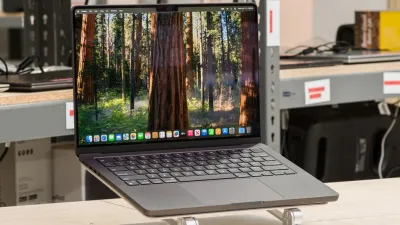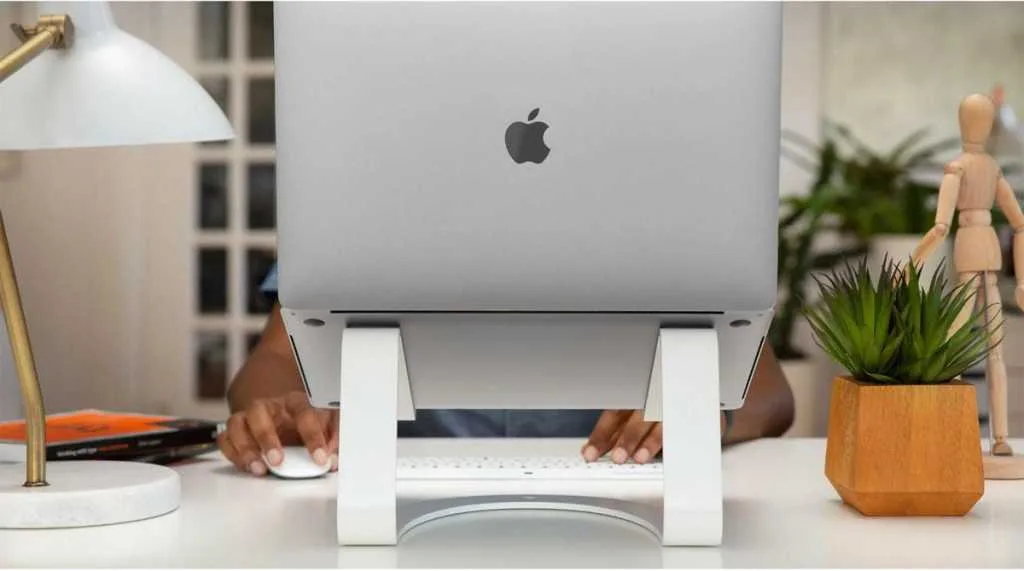
Working on your Apple laptop shouldn't mean sacrificing your posture, which is why investing in the best MacBook laptop stands is essential for preventing long-term physical discomfort. Continual bowing of the head to view a low screen frequently leads to a stiff neck and can even contribute to spinal stenosis. This medical condition can compress blood vessels and displace nerves, ultimately restricting blood supply to the brain.
To combat these ergonomic hazards, elevating your screen to eye level is a mandatory upgrade for any modern desk setup. A proper stand ensures that your eyes remain perfectly in line with the display while you sit with a straight back. This elevated position also dramatically improves your appearance on video calls, preventing the dreaded unflattering camera angle while making it significantly easier to integrate a separate wireless keyboard and mouse.
Laptop stands generally fall into two distinct categories: open eye-level stands and closed vertical stands. Open stands prioritize ergonomics by raising the screen to reduce muscle strain, minimize screen glare, and improve device cooling through better airflow. Conversely, vertical or closed stands are designed for users who rely on external monitors, keeping the MacBook neatly tucked away to free up valuable desk real estate for backup drives, wireless chargers, or a cup of coffee.
Twelve South Curve Flex
Many traditional laptop stands are entirely rigid, offering zero flexibility for users who frequently change their seating position. The Curve Flex from premium accessory manufacturer Twelve South completely remedies this limitation by providing extensive height and tilt adjustability. This premium stand can elevate your MacBook screen and webcam up to 22 inches (56cm), ensuring it sits perfectly at eye level or aligns seamlessly with an external monitor.
Beyond its impressive height range, you can precisely angle the keyboard deck from 0 to 45 degrees for optimal typing comfort. The Curve Flex is also highly portable, weighing just 28 ounces (795g) and folding completely flat to slide into its included padded neoprene travel sleeve. While it carries a premium price tag compared to fixed-position alternatives, its versatility justifies the investment. It is available in matte black or white, and pairs perfectly with the Twelve South Curve Riser for dual-screen setups.
Pros:
- Highly stylish aesthetic
- Multiple height and tilt settings
- Excellent portability
Cons:
- Expensive price point
Plugable Portable Foldable Laptop Stand
For professionals constantly on the move, the Plugable Foldable Laptop Stand delivers unmatched portability. Weighing a mere 12.6 ounces (356g), this collapsible accessory folds down into a remarkably compact 9 by 4.35 by 0.6-inch (23 x 11 x 1.5cm) package. It easily slips into a laptop bag or suitcase, taking up no more room than a slim notebook.
While it does not elevate the MacBook as high as desktop-bound stands, it successfully brings the screen much closer to eye level than leaving it flat on a table. Users can choose from four distinct viewing angles: 25, 30, 45, and a steep 60 degrees. It accommodates any laptop ranging from 12 to 17 inches, and features hidden tabs that allow it to securely support an iPad. The base remains highly stable, making it perfect for tight airplane tray tables or small cafe counters.
Pros:
- Extremely portable (fits easily in a laptop bag)
- Fully foldable design
- Four distinct angle settings
Cons:
- Does not raise the MacBook significantly
- Expensive outside of the U.S. market
Lululook 360 Rotating Foldable Laptop Stand
Ideal for collaborative environments and shared meeting spaces, the Lululook rotating stand features a 360-degree rotatable axis built directly into its base. This allows you to smoothly swing the laptop around to share your screen or reposition the camera during group calls. The rotation mechanism is fluid and produces a reassuring clicking sound as it turns.
Constructed from lightweight aluminum alloy, the stand includes a robust mechanical arm capable of raising the screen by up to 10 inches. It supports large laptops up to 17 inches, though users should avoid tilting it too far back to prevent it from toppling over. The stand is fully foldable for easy transport between offices and features a cut-out base design to dissipate heat and keep your MacBook running efficiently.
Pros:
- Rotates a full 360 degrees
- Multiple height adjustment settings
- Foldable and travel-friendly
Cons:
- Prone to toppling if tilted too aggressively
Rain Design mBar pro+
The mBar pro+ represents the pinnacle of Rain Design's minimalist aluminum stand lineup. It elegantly raises the MacBook nearly 5 inches off the desk, providing a highly sturdy and comfortable typing angle without adding visual clutter to your workspace. When it is time to pack up, it folds down to a sleek 9.6 by 6.3 inches (24 x 16cm) with a thickness of just 0.5 inches (1.2cm).
Weighing only 0.45 pounds (205g), it is the perfect companion for remote workers frequenting co-working spaces. The broader product family also includes the standard mBar ($25), which raises the device 3 inches and weighs just 3.5 ounces (100g) but does not fold, and the mBar Pro ($55), which offers folding capabilities. All models are color-matched to Apple's hardware, available in Silver, Space Gray, or Black.
Pros:
- Ultra-minimalist design
- Exceptionally lightweight
- Foldable architecture
Aulumu G07 POP-UP Laptop Kickstand
Taking a completely different approach to elevation, the Aulumu G07 consists of portable pop-up legs that attach directly to your device. These mini zinc alloy legs feature a built-in spring mechanism, allowing them to be deployed with a simple click and folded away just as effortlessly. Weighing a negligible 1.4 ounces (40g) each, they remain permanently attached to your laptop as you travel.
Designed with smooth, rounded edges and a non-abrasive polyurethane surface, the legs adhere parallel to the underside of the MacBook, ensuring they will never scratch or dent the aluminum chassis. The inclusion of anti-slip rubber pads guarantees that your laptop remains firmly planted on any desk surface during intense typing sessions.
Pros:
- Discreet minimalist design
- Super lightweight construction
- Instant pop-up folding mechanism
Scapade AirStand Pro Foldable Laptop Stand
The travel-ready aluminum AirStand Pro excels in delivering precise ergonomic customization. Its standout feature is the inclusion of ten distinct adjustable height levels, guaranteeing that every user can find their perfect typing and viewing angle to alleviate shoulder strain. The open-frame design actively promotes airflow around the MacBook chassis, ensuring optimal thermal performance.
When folded, the AirStand Pro measures a compact 12 by 9 by 0.8 inches (300 x 230 x 20mm) and weighs exactly 16 ounces (450g). Non-slip silicone pads are strategically placed to keep your expensive Apple hardware completely stable on slippery glass or wood surfaces.
Pros:
- 10 adjustable height levels
- Lightweight aluminum build
- Foldable for travel
MOFT Z Sit-Stand Laptop Desk
Measuring 11 by 9.4 inches (28 x 24cm), the MOFT Z is a multi-angle stand that lies completely flat, mimicking the footprint of a small MacBook for effortless storage. Constructed from premium polyurethane leather and rigid fiberglass, it weighs 34 ounces (960g). While not the lightest option, its unique structural versatility makes it highly transportable.
The MOFT Z can be folded into four different seated viewing angles: 25, 35, 45, and 60 degrees. More impressively, it can transform into a sturdy Z-shaped structure to create a 10-inch elevated platform for standing desk use. Capable of supporting up to 22 pounds (10kg), it is available in Black, Gray, Blue, and Orange, depending on regional availability.
Pros:
- Height adjustable for standing use
- Foldable and highly flexible
- Stylish material finish
Twelve South Curve SE
For users who prefer a permanent, fixed-position setup, the Twelve South Curve SE is an outstanding choice. As a more affordable addition to the Curve family, the SE model requires a simple three-piece assembly out of the box. This snap-together design actually makes the stand easier to disassemble and transport compared to the original welded Curve.
Both the Curve SE and the original Curve elevate your MacBook exactly 6.5 inches off the desk, forcing you to sit up straight and look directly at your screen. The metal architecture features non-slip silicone grips on the bottom base and the supporting arms. While the pre-assembled original Curve comes in matte black and white, the SE is exclusively available in Silver. For alternative fixed options, the Rain Design mStand ($49) offers a sturdy unibody design in six colors, while the mStand 360 ($59) adds a rotating base.
Pros:
- Stylish, Apple-matching aesthetic
- Provides a decent ergonomic height
- Great price-to-performance ratio
Cons:
- Limited to only one height setting
Twelve South HiRise Pro for MacBook
The HiRise Pro is a premium height-adjustable stand that seamlessly integrates wireless charging into your workspace. It can raise your MacBook screen anywhere from 2.5 to 6 inches via a secure adjustment screw at the rear. Its defining feature is a hidden cut-out chamber in the base designed to invisibly house an Apple MagSafe Charger (sold separately for $39).
Once installed, the base acts as a dedicated charging pad, delivering up to 15W of wireless power to an iPhone 12 through 15, up to 25W for the iPhone 16, or 5W for AirPods in a wireless case. This clever integration maximizes desk space while keeping your phone accessible. A notable competitor is the Alogic Elite Power Laptop Stand, which raises the laptop 8 inches and includes a built-in Qi pad, though it maxes out at 7.5W and lacks magnetic alignment.
Pros:
- Smooth height adjustability
- Integrated housing for Apple MagSafe Charger
- Highly stylish design
Cons:
- Lacks screen tilt functionality
Urmust Laptop Notebook Stand Holder
For remote workers navigating cramped home offices or small desks, the Urmust Laptop Stand is a space-saving lifesaver. This adjustable aluminum-alloy stand raises the laptop screen up to 10 inches while tilting between 0 and 90 degrees. By elevating the device, it reclaims valuable desk space underneath for notebooks, external drives, or a coffee mug.
The stand is capable of supporting up to 4kg and accommodates laptops up to 15.6 inches. Its super-narrow footprint makes it ideal for tight environments, and its foldable nature allows it to be easily stowed away. It features anti-slip rubber feet to protect your desk surface and is available in seven distinct colors, including Rose Gold, Blueish Grey, and Red.
Pros:
- Multiple height and tilt settings
- Foldable and compact
- Wide variety of color options
Cons:
- Somewhat plain industrial design
Hyperdrive 7-in-1 USB-C Hub Laptop Stand
The Hyperdrive 7-in-1 brilliantly merges ergonomic elevation with extensive connectivity. This collapsible stand features a built-in USB-C hub integrated directly into the frame, expanding the limited ports on modern MacBooks. It connects to your laptop via its own integrated USB-C cable, leaving the hub's secondary USB-C port free for a PD wall charger capable of supporting up to 100W of passthrough power.
Weighing just 11 ounces (308g), the stand offers five ergonomic viewing positions and features a silicone-cushioned base to secure your device. While the connection utilizes standard USB-C rather than Thunderbolt, it provides ample bandwidth for most users.
Pros:
- Built-in multi-port USB-C hub
- Integrated connection cable
- Highly portable and foldable
Cons:
- Relies on USB-C rather than faster Thunderbolt speeds
Port Specifications:
- One 5Gbps USB-C port
- Two 5Gbps USB-A 3.0 ports
- HDMI port supporting 4K resolution at 30Hz
- UHS-I SD and microSD card slots for portable storage expansion
Rain Design iLevel
The iLevel from Rain Design prioritizes effortless adjustability over ultra-slim aesthetics. While it features a slightly chunkier profile, it incorporates a highly intuitive sliding knob mechanism on the front panel. This allows users to smoothly and accurately adjust the screen height and typing angle without having to remove the laptop from the stand.
Constructed from premium anodized aluminum, the iLevel2 can raise the rear of a MacBook between 6.5 and 8.5 inches above the desk surface. It is an incredibly sturdy solution for permanent desk setups and is available in Silver, Space Gray, and Black finishes.
Pros:
- Effortless height adjustability via sliding knob
- Stylish anodized aluminum design
Cons:
- Chunky overall footprint
Twelve South BookArc Flex
For users who operate their MacBook exclusively in clamshell mode with an external monitor, a closed vertical stand is the ultimate space-saving solution. The Twelve South BookArc Flex is a minimalist metal stand that holds your MacBook vertically, transforming it into a miniature desktop tower.
The stand utilizes a brilliant gravity-based design: the physical weight of the MacBook naturally draws the stand's supporting arcs together, gently but firmly cradling the device. It automatically adjusts to fit any MacBook size, including the thick 16-inch Pro models (up to 1-inch thick), without requiring the swappable silicone inserts found on older models. It is available in matte black, matte white, and a premium mirrored chrome edition.
Pros:
- Minimalist and highly stylish
- Space-saving closed vertical design
- Available in white, black, or premium chrome
Cons:
- Requires the laptop to remain closed during use
PWR+ Ergonomic Laptop Stand
The PWR+ Ergonomic Laptop Stand functions like a highly adaptable transformer for your workspace. It features articulating legs that can morph into almost any shape or height required, reaching significantly higher elevations than traditional desktop stands. The surface can be angled for typing or locked completely flat to serve as a standalone elevated table.
Adding to its utility, the main tray houses two USB-powered cooling fans to actively reduce your laptop's thermal load during heavy processing tasks. Its versatility even allows it to be used as a standing tray in bed. While it is bulkier than standard collapsible stands, it folds down easily for storage.
Pros:
- Extensive multiple height settings
- Highly stable articulating design
- Integrated USB-powered cooling fans
Cons:
- Bulky form factor when deployed
Anker 675 USB-C 12-in-1 Docking Station and Monitor Stand
Blurring the line between a laptop accessory and a full desktop hub, the Anker 675 is designed to sit beneath a large external display while managing all your MacBook's peripherals. It is best utilized in a setup where your MacBook sits in a closed vertical stand, connecting to the Anker hub via a single USB-C cable.
The stand elevates your external monitor to an ergonomic height while providing a massive array of fast connectivity ports tucked neatly underneath. Furthermore, the top surface features an integrated wireless charging pad for your smartphone, making it a comprehensive command center for power users.
Pros:
- Stylish combination of a monitor stand and USB hub
- Effectively raises monitor height
- Features a wide array of fast USB ports
- Includes a wireless phone charging pad
Cons:
- The stand itself is not height adjustable
Satechi Dual Laptop Stand
If your daily workflow involves juggling multiple devices, the Satechi Dual Vertical Stand is engineered to keep your desk immaculate. This 2-in-1 closed stand features a weight-balancing base and a stress-resistant aluminum frame capable of vertically cradling two laptops, two tablets, or two smartphones simultaneously.
The internal slots are lined with a protective silicon mat featuring grip beds to prevent any unwanted scratches on your expensive hardware. Non-slip pads on the bottom ensure the entire rig remains upright and stable, making it the perfect companion for a multi-device docking station setup.
Pros:
- Securely holds both a laptop and a tablet simultaneously
Cons:
- Requires devices to be in a closed position
Bestand Aluminum Cooling Stand
For users pushing their MacBooks to the limit with heavy video editing or gaming, thermal management is just as important as ergonomics. The Bestand Aluminum Cooling Stand lifts your device to eye level to correct your posture, while specifically addressing heat dissipation.
The main resting pad features three large, strip-shaped holes that allow heat to escape from the bottom chassis of the MacBook. This provides a noticeable degree of passive cooling compared to solid aluminum stands that lack basic ventilation. It is available in Silver or Gray to perfectly match Apple's aesthetic.
Pros:
- Provides a decent ergonomic height setting
- Integrated cooling holes for better thermal performance
Cons:
- Limited to a single fixed height setting
Other Notable Minimalist Stands
If the extensive list above doesn't perfectly match your specific desk aesthetic, the market offers several other highly refined options designed for minimalists and clamshell users:
- Rain Design mTower: A highly minimal closed vertical stand that takes up a fraction of the desk space, though it requires the laptop to remain shut.
- Twelve South BookArc: The elegant predecessor to the Flex model, offering a stylish fixed-arch design at a highly competitive price point.
- OMoton Vertical Laptop Stand: A simple, no-frills closed stand featuring adjustable widths to accommodate various laptop thicknesses, though its design is decidedly plain.
The Shift Toward Multi-Functional Workspace Hubs
The laptop stand market in 2026 has clearly evolved far beyond simple pieces of bent aluminum. We are witnessing a definitive industry shift where ergonomic accessories are actively merging with power delivery and connectivity hubs. Products like the Hyperdrive 7-in-1 and the Twelve South HiRise Pro demonstrate that consumers no longer want separate dongles, chargers, and stands cluttering their desks; they demand unified, multi-functional solutions.
This consolidation is driven by the minimalist design language of modern MacBooks, which often lack legacy ports. By integrating MagSafe charging and high-bandwidth USB-C hubs directly into the structural frame of the stand, manufacturers are solving two pain points simultaneously: physical neck strain and digital connectivity limits. For anyone building a new home office setup, investing in a hybrid hub-stand is now the most logical and cost-effective strategy.