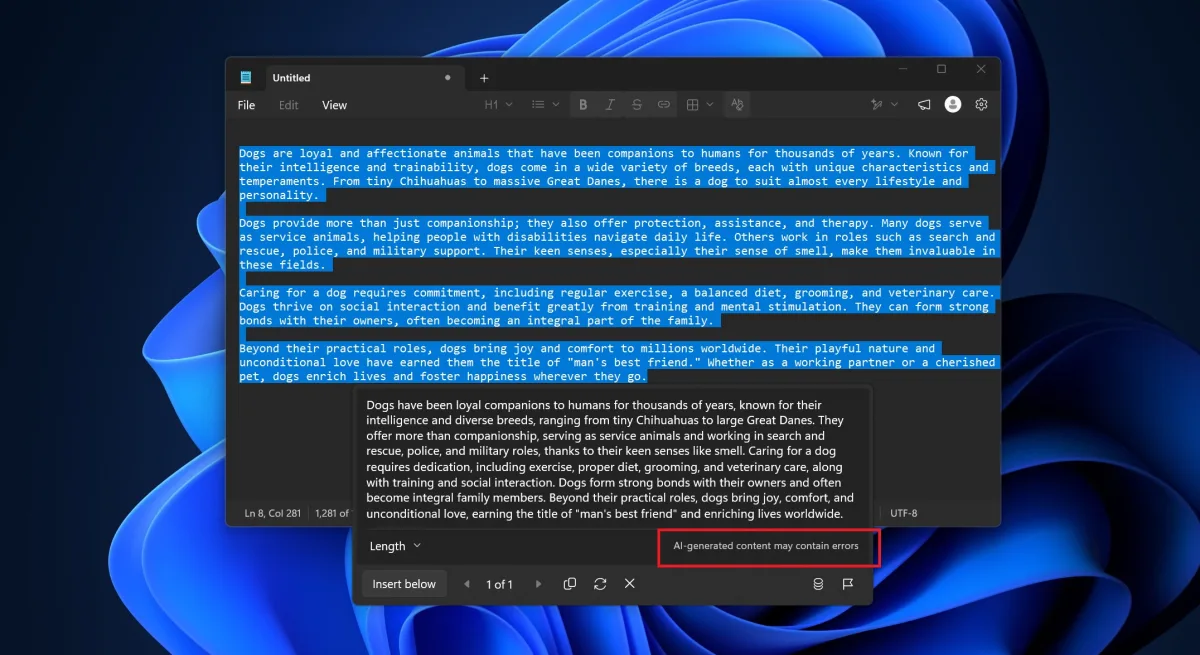
Microsoft is quietly scrubbing the Copilot name from its most basic text editor, but users hoping for a completely AI-free experience might be disappointed. The latest Windows 11 Notepad update removes all explicit Copilot branding, replacing it with a generic "Writing tools" menu that still relies on the exact same generative AI models. The update is currently rolling out to production PCs via the Microsoft Store, moving the changes out of the Insider testing phase and into the hands of the general public.
For everyday Windows 11 users and privacy-conscious professionals, this update fundamentally changes how AI integrates into your daily workflow. Instead of a flashy Copilot button, the AI is now baked directly into the context menu, meaning you need to manually disable it in settings if you want a truly offline text editor. On March 20, Microsoft announced plans to reduce "unnecessary Copilot entry points" across native apps like Photos, Widgets, and Snipping Tool. This shift reflects a broader strategy to make AI feel like a native, invisible utility rather than an intrusive chatbot, though the execution varies wildly between applications.
How to Access (or Disable) the New Writing Tools
Once your system installs the fresh copy of Notepad, the AI features are no longer explicitly labeled as Copilot. Instead, Microsoft describes the suite as "Smarter writing tools." You can access these capabilities through the dedicated Writing tools menu or simply by right-clicking selected text in your document.
The core functionality remains identical to the previous Copilot integration. The available features include:
- Rewrite: Refines the clarity, tone, or structure of your selected text, allowing you to shift from casual to formal formatting.
- Summarise: Condenses longer sections of text into key highlights.
- Write: Generates entirely new content based on a custom prompt or selected text.
Microsoft does disclose that these tools generate content using AI when you open the feature and type a prompt. However, if you prefer a classic, AI-free Notepad experience, the feature is entirely optional. You can completely disable the integration by navigating to the app's Settings menu and toggling off the Writing Tools option.
Snipping Tool Drops AI Entirely
While Notepad merely rebranded its AI integration, the Snipping Tool took a much more drastic approach. In the latest production release, Microsoft has completely removed the Copilot button from the screenshot utility. If you are running the up-to-date version from the Microsoft Store, the AI integration is entirely gone.
This confirms Microsoft's promise to eliminate AI from places where it fails to add genuine value. For users who felt the Copilot button cluttered the simple interface of the Snipping Tool, this removal is a welcome return to form.
The Invisible AI Strategy
Microsoft’s decision to rebrand Copilot as "Smarter writing tools" in Notepad signals a major pivot in how the company markets generative AI. The initial wave of Windows 11 AI integration was loud and branded, designed to make sure users knew Copilot was everywhere. Now, by stripping the branding but keeping the functionality, Microsoft is attempting to normalize AI as a standard OS feature, much like spellcheck or autocorrect.
However, this stealthy approach could backfire with privacy advocates. Renaming a cloud-based AI model to sound like a basic local utility is arguably misleading, especially since the tool still processes text prompts to generate content. The complete removal of Copilot from the Snipping Tool proves Microsoft is willing to backtrack on forced integration, but the Notepad strategy shows they are still determined to keep AI in our daily typing habits - just under a different name.