Selling a used MacBook Pro can yield a significant return, but overlooking critical hardware and software details can drastically reduce your final asking price. While Apple's M-series laptops hold their resale value better than most competitors, buyers are increasingly scrutinizing battery health, update eligibility, and physical condition before handing over their cash. If you are planning to upgrade, understanding what depreciates your machine is the first step to securing a premium offer.
Even though a used MacBook Pro retains much of its original worth, expecting to recoup your entire initial investment is unrealistic. However, by avoiding a few common pitfalls, you can ensure your listing stands out in a crowded secondary market. From physical maintenance to navigating the software lifecycle, here is exactly what you need to manage before selling.
Physical Condition and Total Transparency
While you can certainly sell a MacBook Pro with broken components, you should not expect to receive anywhere near the price of a fully functioning machine. Missing keyboard keys, a cracked screen, or even minor scuffs and scratches will immediately lower the device's value. Water damage is particularly detrimental and serves as one of the biggest red flags for potential buyers.
Preventative care is the easiest way to protect your investment. Keeping your workstation clean, ensuring the device is well-ventilated, and using a protective sleeve during transport can prevent costly accidents. Regularly wiping down the chassis with a microfiber cloth also keeps the laptop looking pristine for listing photos.
If your machine does have issues, transparency is crucial. Disclosing known hardware or software problems helps buyers understand what they are getting into and builds trust. While you might be tempted to fix minor issues yourself, the repair costs often outweigh the potential increase in resale value.
Battery Degradation and Cycle Counts
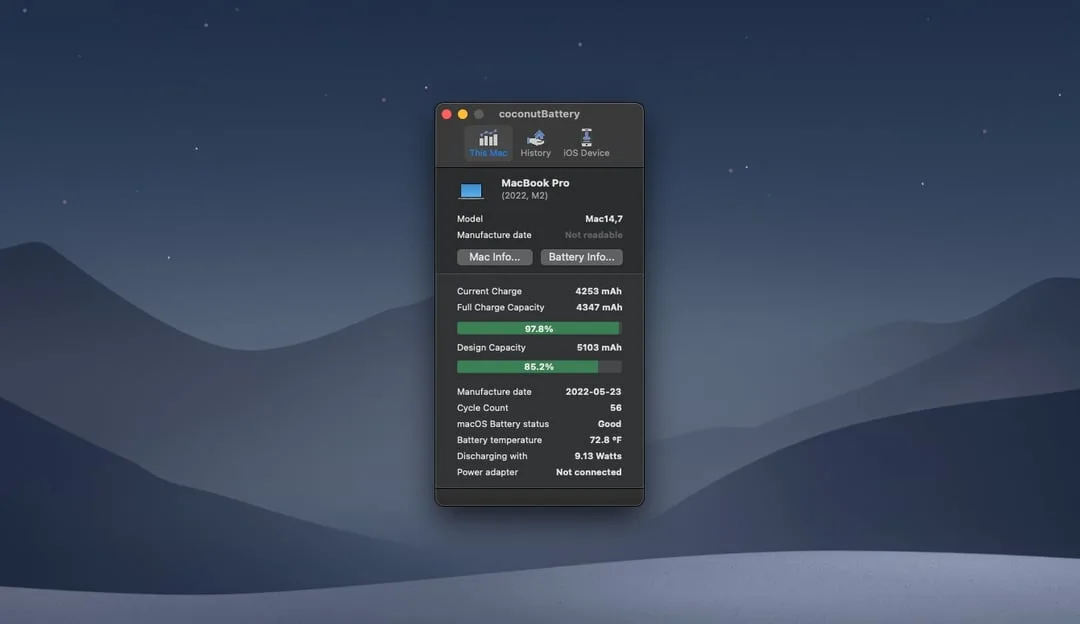
Because lithium-ion batteries naturally degrade over time, a weak or dead battery will severely impact your asking price. Buyers do not expect a factory-fresh battery, but they do expect the laptop to hold a reliable charge. Modern MacBook Pro models are designed to retain approximately 80% of their original charge capacity at their maximum cycle count.
For MacBook Pros manufactured since 2009, the maximum cycle count is typically 1,000. This number is the most objective metric a buyer will use to judge the condition of your battery. To preserve battery health before selling, avoid leaving the laptop plugged in constantly, keep it out of extreme temperatures, and utilize built-in features like Optimized Battery Charging.
To check your exact battery cycle count before listing the device, follow these steps:
- Hold the Option key and click the Apple icon in the menu bar.
- Select System Information from the dropdown menu.
- Navigate to Power in the right-hand column under the Hardware section.
- Locate the exact number under Battery Information to share with potential buyers.
Software Obsolescence and macOS Updates
Running the latest software is vital for security, but it also directly dictates the resale value of your MacBook Pro. If a device is no longer capable of receiving official software updates, buyer interest will plummet. Apple typically releases a new version of macOS annually, systematically dropping support for older hardware.
For example, when Apple transitioned to macOS Tahoe 26, the 2019 MacBook Pro 16-inch became the oldest supported model, and several older MacBooks will not receive the upcoming macOS 27. While some obsolete models receive security patches for up to three release cycles, Apple eventually cuts these off entirely, causing core apps and iCloud services to stop functioning properly.
To verify your current software status and ensure your machine is fully updated before selling, follow these steps:
- Click the Apple icon from the top menu bar.
- Navigate to System Settings.
- Select General from the sidebar, then click Software Update to check for available patches.
Timing the Used Laptop Market
Getting the most money out of your MacBook Pro requires timing your sale strategically. The used laptop market fluctuates, and the older a machine gets, the faster it depreciates. One of the best times to sell is right before Apple announces new hardware, as buyers often fear pricing structure changes or simply want to avoid the depreciation hit that follows a new release.
Apple traditionally announces new products in March, June, September, or October, making these critical windows for research. The optimal lifecycle sweet spot for selling is generally between two and four years after the initial purchase. During this window, the MacBook Pro is still considered a current-generation device, demand remains high, and prices have not yet dropped significantly.
Choosing the Right Resale Platform
Deciding where to sell your laptop ultimately comes down to choosing between a quick transaction and the highest possible return. Apple offers its own Apple Trade In program, which provides a fast, hassle-free way to exchange your old device for credit toward a new one, though the valuations are often lower than private sales.
If you want maximum cash, platforms like Craigslist, Facebook Marketplace, or eBay will yield a higher return. However, these platforms require more effort to manage listings, answer buyer questions, and facilitate the final handoff. Selling to a local third-party retailer offers a middle ground, providing faster cash but requiring you to give the store a cut of the profits. Always research what similar models - factoring in upgrades like additional RAM - are currently selling for to set a realistic asking price.
The Hidden Cost of Holding On Too Long
The transition to Apple Silicon fundamentally altered the depreciation curve for MacBooks, making the "two to four year" selling window more critical than ever. Holding onto an Intel-based Mac, or even an early M1 model, until it officially loses macOS support turns a depreciating asset into an obsolete one almost overnight. As seen with the 2019 MacBook Pro 16-inch barely making the cut for macOS Tahoe 26, the software cutoff is a hard cliff for resale value.
Sellers often make the mistake of pricing their used laptops based on the original MSRP rather than the current market reality. If your device is approaching that three-year mark and you are noticing performance drops, selling it while it still supports the latest macOS is the smartest financial move. Waiting until the battery crosses the 1,000-cycle threshold or the OS is permanently locked out of iCloud updates will leave you with a machine that is better suited for recycling than reselling.