Managing AWS lifecycle upgrades is a relentless operational burden that drains engineering hours and risks production stability. When managed services like Amazon EKS or Amazon RDS approach their end-of-support deadlines, teams scramble to identify affected resources, update infrastructure-as-code (IaC) definitions, and validate changes before time runs out. This manual process is prone to human error and compounds significantly when multiple services require updates simultaneously.
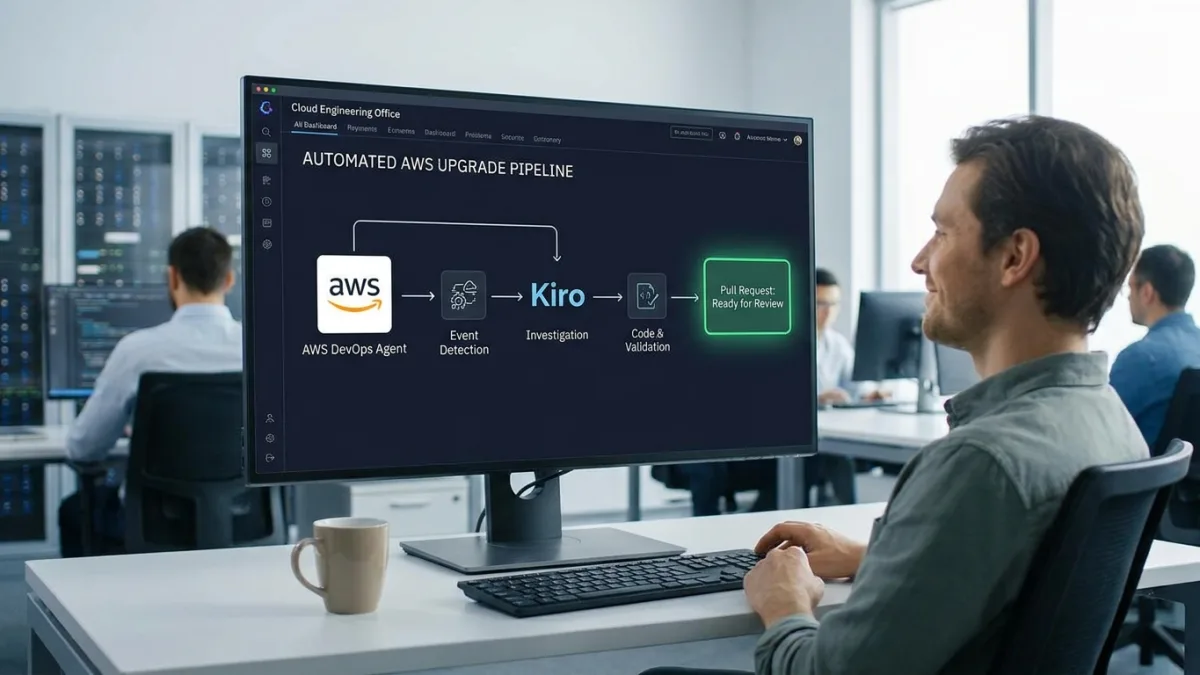
By combining the AWS DevOps Agent with Kiro, organizations can transform this manual scramble into a fully automated, event-driven workflow. This guide is designed for Site Reliability Engineering (SRE) teams and cloud architects who want to shift from executing routine version upgrades to simply reviewing pre-validated pull requests. Implementing this pipeline ensures that upgrades are investigated, coded, and validated autonomously, drastically reducing operational toil.
The Architecture of Automated Upgrades
The automated upgrade pipeline operates through a five-phase event-driven architecture. It begins with event detection and ends with a validated pull request ready for human review.
Phase 1: Detection
The pipeline initiates when AWS Health publishes an AWS_EKS_PLANNED_LIFECYCLE_EVENT to the default Amazon EventBridge bus. This event signals that a managed service version is approaching its end of standard support.
service: EKS
eventTypeCategory: scheduledChange
eventTypeCode: AWS_EKS_PLANNED_LIFECYCLE_EVENT
affectedEntities: <array of cluster ARNs with status: PENDING>
eventRegion: <region of the affected cluster>
An Amazon EventBridge rule named eks-health-planned-lifecycle matches this specific event and invokes the AWS Lambda function devops-agent-health-event. This function extracts the cluster name and region, constructs a webhook payload with a high-priority incident flag, and posts it to the AWS DevOps Agent webhook endpoint. This instructs the agent to execute the eks-upgrade-planning skill.
Phase 2: Investigation
Once triggered, the AWS DevOps Agent utilizes the eks-upgrade-planning skill to map the cluster topology, validate version increments, check add-on compatibility, and scan for deprecated APIs. It then generates a structured AWS Cloud Development Kit (AWS CDK) Change Spec.
This specification includes target version strings, a rollback readiness assessment, a feasibility verdict (such as READY or BLOCKED), and a risk rating. Upon completion, the agent emits an Investigation Completed event back to Amazon EventBridge.
source: aws.aidevops
detail-type: Investigation Completed
detail.metadata.agent_space_id: <the agent space ID>
detail.metadata.task_id: <the backlog task ID>
detail.metadata.execution_id: <the execution ID>
detail.data.status: <investigation result status>
Phase 3: Code and Validation
A secondary Amazon EventBridge rule, devops-agent-investigation-events, captures this completion event and triggers the devops-agent-trigger-upgrade Lambda function. This function retrieves the investigation journal, verifies the presence of a valid CDK Change Spec, and dispatches a GitHub Actions workflow using a GitHub Personal Access Token stored in AWS Secrets Manager.
The GitHub Actions workflow enforces strict validation. It scans the payload for fenced code blocks containing the CLUSTER_VERSION and ensures no placeholder markers remain. If the agent's feasibility assessment is marked as BLOCKED, the workflow halts immediately. Once validated, the workflow installs the Kiro CLI and executes it in headless mode.
kiro-cli chat --no-interactive --trust-tools=read,write,glob,grep \
"Read kiro-cdk-instructions.md for context on the CDK patterns. Then read /tmp/cdk-change-spec.txt  -  it contains the validated CDK Change Spec extracted from the DevOps Agent investigation. Apply those values exactly. Modify lib/iteration3-stack.ts ONLY. Do NOT derive or guess version numbers  -  use only the values from the spec file. Make only the file edits  -  do not run any build or shell commands, and do not commit."
Kiro is intentionally restricted to file tools only (read, write, glob, grep) and is explicitly instructed not to derive version numbers independently. After Kiro modifies the lib/iteration3-stack.ts file, the pipeline runs a containment check to ensure no other files were altered, updates the kubectl layer dependency, and runs a full CDK synthesis to guarantee the code compiles.
Phase 4: Review and Deploy
After Kiro exits successfully, the workflow opens a GitHub Pull Request on a dedicated upgrade branch. The PR body includes a rollback window advisory, a reviewer checklist, and a machine-readable investigation-context block containing the agent space ID.
The automated pipeline pauses here. The Site Reliability Engineering (SRE) team reviews the changes using their standard approval process. After merging, the team deploys the update using their existing CI/CD pipeline, with the context tags ensuring traceability.
Phase 5: Failure Detection and Automated Mitigation
If a deployed upgrade fails, CloudFormation emits a stack status change event (like ROLLBACK_FAILED) to Amazon EventBridge. This triggers the Failure Lambda function, which opens a new investigation using the eks-failure-root-cause skill.
The agent analyzes the failure and produces a root-cause assessment. A Trigger Lambda function then activates the Mitigation Agent to generate a recovery plan. If a code fix is viable, Kiro CLI implements the agent-ready specification and opens a new pull request, while simultaneously sending an Amazon SNS alert to the SRE team with immediate recovery steps.
Keeping Agent Skills Current
AWS services evolve continuously, meaning a skill written today may contain outdated version constraints within weeks. To prevent this, the pipeline includes an automated daily review loop.
An Amazon EventBridge rule triggers a Skill Review Lambda function daily, which fetches all skill files and posts them to the agent space. The agent runs the eks-skill-review skill to verify claims against authoritative AWS sources. If gaps are found, a GitHub Actions workflow uses Kiro CLI to apply edits to the skill files and opens a pull request for the team to review.
Critical Safety Constraints for Amazon EKS
Amazon EKS upgrades carry inherent risks that necessitate strict automated safety checks. The pipeline enforces several non-negotiable constraints.
- Single Minor Version Upgrades: EKS does not support skipping Kubernetes versions. The agent validates this and halts if a version skip is detected.
- 7-Day Rollback Window: Control plane upgrades can be reverted within seven days, provided rollback readiness checks pass. The PR body explicitly documents this window.
- VPC CNI Ordering: The Amazon VPC CNI add-on must be updated before any node group update to prevent networking loss. The CDK stack enforces this via a CloudFormation
DependsOndeclaration. - Destructive Change Prevention: A 'Replace' action in EKS means cluster destruction. The pipeline prevents this through layered gates, including Kiro's restricted file access and a mandatory
cdk diffreview by a human before deployment.
How to Deploy the Automated Upgrade Pipeline
Follow these steps to deploy the complete solution into your AWS account. It is highly recommended to deploy this in a development environment first to avoid unexpected charges.
- An AWS account with AWS CDK bootstrapped and AWS CLI v2 configured.
- Node.js 20.x or later and
npminstalled. - A GitHub Personal Access Token (PAT) with Read and Write permissions for Actions, Contents, and Pull requests.
- A Kiro CLI API key (requires a Pro, Pro+, or Power subscription).
- Clone the sample repository to your local machine. This provides the necessary bootstrap scripts and infrastructure code to deploy the pipeline.
git clone https://github.com/aws-samples/sample-automate-planned-lifecycle-upgrades-with-aws-devops-agent-and-kiro.git
cd sample-automate-planned-lifecycle-upgrades-with-aws-devops-agent-and-kiro- Execute the bootstrap script to provision the foundational AWS resources. This script deploys the Amazon EKS cluster, the AWS DevOps Agent space, Lambda functions, and Amazon EventBridge rules required for the event-driven architecture.
./bootstrap.sh- Configure the webhook credentials, GitHub PAT, and Kiro API key in AWS Secrets Manager. This ensures that sensitive credentials are securely stored and accessed only by authorized Lambda functions at runtime.
- Launch the AWS DevOps Agent space web app from the AWS console. This interface allows operations teams to manage instructions and upload custom skills.
- Paste the global instructions into the Knowledge > Instructions > All agents (Knowledge > Instructions > All agents) section. These instructions enforce hard isolation boundaries between upgrade planning and failure root-cause analysis.
- Zip the custom skill folders located in the repository. Compressing these files is required before uploading them to the AWS DevOps Agent web app.
cd skills
zip -r eks-upgrade-planning.zip eks-upgrade-planning
zip -r eks-failure-root-cause.zip eks-failure-root-cause
zip -r eks-investigation-triage-rules.zip eks-investigation-triage-rules
zip -r eks-skill-review.zip eks-skill-review- Upload each zipped skill file via the Settings > Skills > Custom Skills (Settings > Skills > Custom Skills) menu. Ensure each skill is scoped to the correct agent type (e.g., Incident RCA or Incident Triage) so it activates in the proper context.
- Subscribe your on-call email to the
eks-upgrade-failure-mitigationandeks-skill-update-notificationsSNS topics. This guarantees your team receives immediate alerts for mitigation plans and daily skill review findings.
Security Best Practices
This solution implements robust security measures to protect your infrastructure during automated operations.
- Secrets Management: Webhook HMAC credentials and the GitHub PAT are stored in AWS Secrets Manager, never hard-coded.
- Least-Privilege IAM: Each Lambda function operates with a dedicated IAM role granting only the minimal permissions required.
- Webhook Authentication: Communications between Lambda functions and the AWS DevOps Agent use HMAC-SHA256 signed payloads.
- Constrained Agent Tooling: Kiro CLI is restricted to file tools only, preventing arbitrary shell command execution during the coding phase.
To remove the deployed resources and avoid ongoing charges, run the provided cleanup script.
./cleanup.shThe Autonomous Future of Cloud Operations
The integration of AWS DevOps Agent and Kiro represents a fundamental shift from traditional Infrastructure as Code (IaC) management to truly agentic workflows. While automating the "happy path" of an EKS upgrade is valuable, the real breakthrough here is the closed-loop failure mitigation. Most automation pipelines fail gracefully but leave the resulting mess for human engineers to untangle under pressure.
By engineering a system that detects a CloudFormation rollback, autonomously initiates a root-cause analysis, and generates a mitigation pull request, AWS is demonstrating how AI agents can handle Day 2 operations. This pipeline doesn't just execute commands; it respects strict safety boundaries, verifies its own dependencies, and even audits its own skills daily. For SRE teams, this means transitioning from reactive firefighters to strategic reviewers, fundamentally changing the economics of managing cloud infrastructure at scale.
This article was written by AI from reporting by aws.amazon.com.