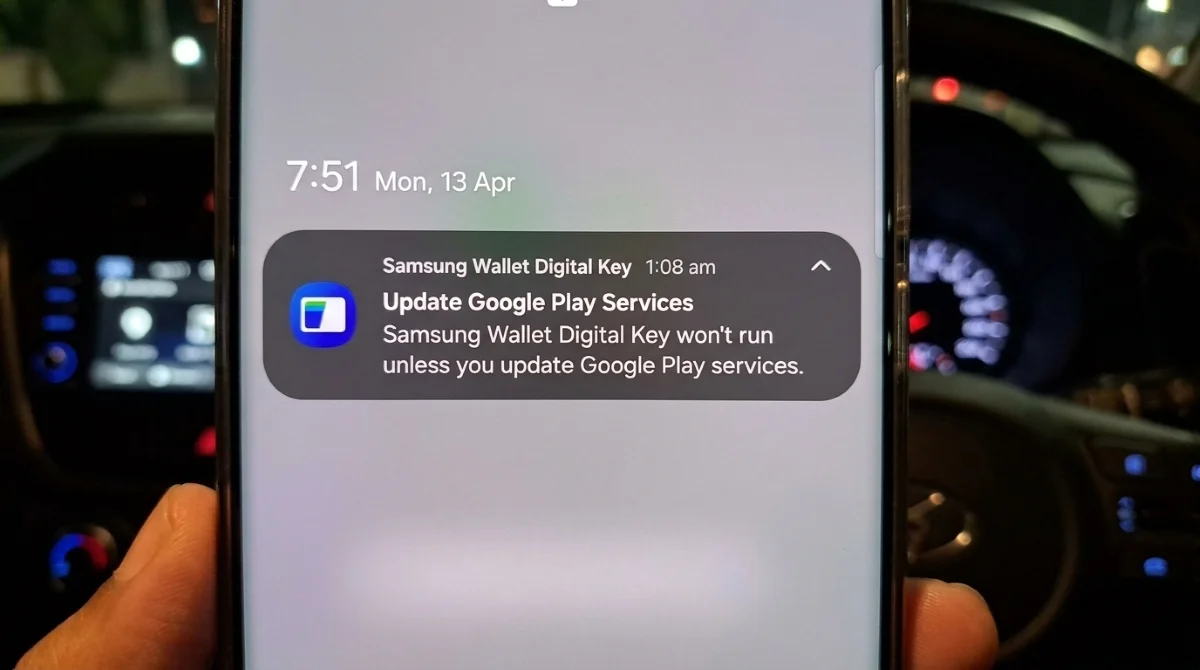
Galaxy users relying on the Samsung Wallet digital key feature could soon find themselves locked out of their cars and homes if they neglect a critical background update. Samsung has begun issuing urgent notifications to device owners, warning that outdated versions of Google Play Services will break the functionality of stored digital keys. For users who have integrated their daily routines around unlocking smart doors or vehicles with their phones, ensuring this silent system app is current is now a mandatory requirement.
The urgency follows a recent expansion of the Samsung Wallet ecosystem, which recently added support for smart door locks alongside its existing digital car key capabilities. While Samsung manages the wallet interface, the underlying secure communication and location protocols rely heavily on Google's infrastructure. According to reports from the community, some users are receiving the update prompt even if their devices are already current, indicating a cautious, widespread rollout by Samsung to prevent lockouts.
It is crucial to distinguish between Google Play Services and standard Google Play system updates. While system updates handle core Android security features like Theft Protection, Play Services acts as the vital bridge ensuring that app notifications, location tracking, and secure hardware handshakes function seamlessly across the Android ecosystem.
How to Update Google Play Services for Your Samsung Wallet Digital Key
- Open the Settings app on your Galaxy device and navigate to Google services. This grants access to the core Google account and system preferences required for the update.
- Tap on All services and locate the System services option under the Privacy and security section. This specific menu houses the background frameworks that power features like digital keys.
- Select System services to automatically check for any pending Google Play Services updates. This forces the device to ping Google's servers and bypass the standard automated update schedule.
- Restart your smartphone if prompted after the installation completes. This ensures the new background protocols are fully initialized and your digital keys remain active.
The Hidden Backbone of Smart Ecosystems
The requirement to update Google Play Services to maintain a native Samsung feature highlights the deeply intertwined nature of modern Android ecosystems. Even as Samsung pushes its own Wallet app as a premium alternative to Google Wallet, it remains fundamentally reliant on Google's foundational APIs for secure, real-world hardware interactions. This dependency ensures cross-device compatibility but also creates a single point of failure for critical features.
This situation serves as a stark reminder for power users: maintaining a smart home or digital vehicle ecosystem requires more than just updating the visible app interface. The invisible system bridges are equally critical to preventing a digital lockout. As smartphones increasingly replace physical keys, users must adapt to treating background system maintenance with the same importance as keeping a physical keyring secure.
This article was written by AI from reporting by androidauthority.com.