For Android users frustrated by rigid time-based display schedules, a third-party application called Adaptive Theme introduces a highly requested feature: automatic dark mode switching based on ambient light. By utilizing the smartphone's built-in ambient light sensor, the app dynamically toggles between light and dark interfaces without requiring manual intervention. This eliminates the need to rely solely on sunset-to-sunrise schedules, which often fail to account for dark indoor environments during the day or bright artificial lighting at night.
This tool is specifically designed for power users and interface customization enthusiasts who frequently transition between varying lighting conditions. By automating the theme switch, Adaptive Theme eliminates the need to constantly pull down the quick settings menu, actively reducing eye strain in dimly lit rooms while ensuring maximum screen visibility under direct sunlight.
How Adaptive Theme Controls Brightness Thresholds
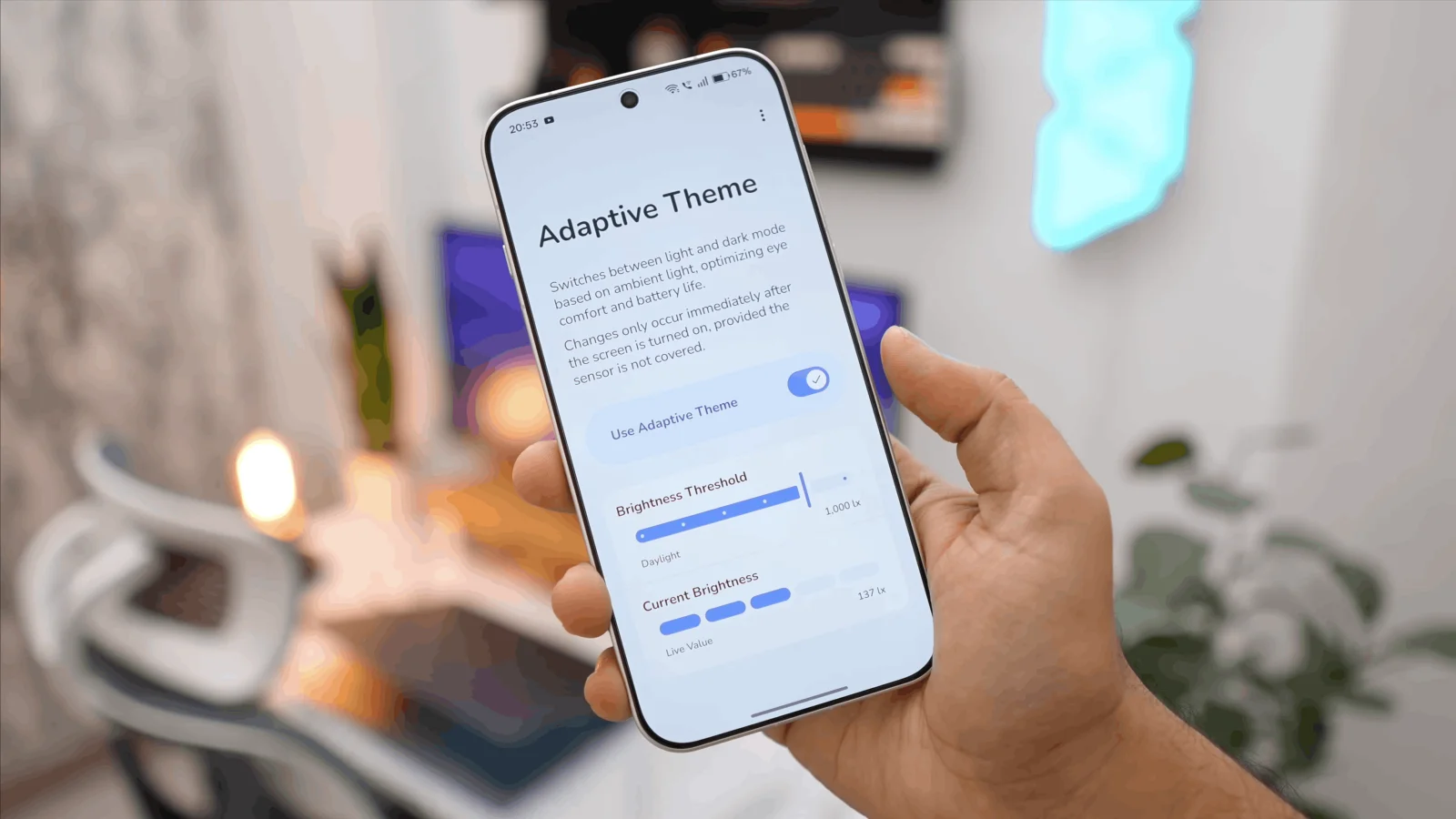
The application features a streamlined design that integrates smoothly with Google's Material You aesthetic. It operates primarily from a single screen containing a master toggle and two critical data points: Brightness Threshold and Current Brightness. Users can select from six preset brightness levels to trigger the dark mode transition, or input a custom numerical threshold ranging anywhere from 0 to 10,000 lux for precise control.
Finding the perfect crossover point requires a brief period of trial and error to match individual preferences and device sensor sensitivity. According to initial testing, setting the threshold between 300 and 400 lux serves as an ideal sweet spot for most daily environments. If the threshold is set too high or too low, the interface may switch too frequently or fail to trigger at all.
System Requirements and Shizuku Integration
While Adaptive Theme delivers a seamless experience once configured, it does come with specific technical requirements and operational quirks. The application does not require users to root their devices, but it does demand access to system-level features that Android typically restricts from third-party tools. To bypass these restrictions, the app relies entirely on Shizuku, a separate utility that grants elevated permissions to other applications.
The setup process for Shizuku is notably more complex than Adaptive Theme's straightforward interface, which may deter casual users. Additionally, the app possesses a functional limitation regarding when the theme actually changes. The transition between light and dark modes only executes after the phone has been unlocked, meaning users will not see the shift happen dynamically on the always-on display or lock screen before interaction.
My Take
The reliance on a workaround like Shizuku highlights a persistent gap in stock Android's customization capabilities. While Google has heavily invested in the Material You design language to make the OS feel more personal, the absence of an ambient light-triggered dark mode feels like a glaring omission. Until native OS-level integration arrives - which would ideally allow system wallpapers to shift alongside the UI - Adaptive Theme serves as an essential, albeit slightly complex, solution for Android enthusiasts who demand granular control over their viewing experience.
Frequently Asked Questions
Does Adaptive Theme require a rooted Android phone?
No, the application does not require root access. However, it does require users to install and configure the Shizuku app to grant the necessary system-level permissions for theme switching.
When does the interface actually switch between light and dark modes?
Due to Android system limitations, the app only applies the theme change after the device has been unlocked by the user, rather than switching dynamically while the screen is off.
Can I set an exact light level for the dark mode trigger?
Yes, the app allows users to input a custom numerical threshold anywhere between 0 and 10,000 lux, utilizing the Current Brightness reading to help find the perfect setting.