Windows 11's Taskbar Gets a Visual Battery Overhaul
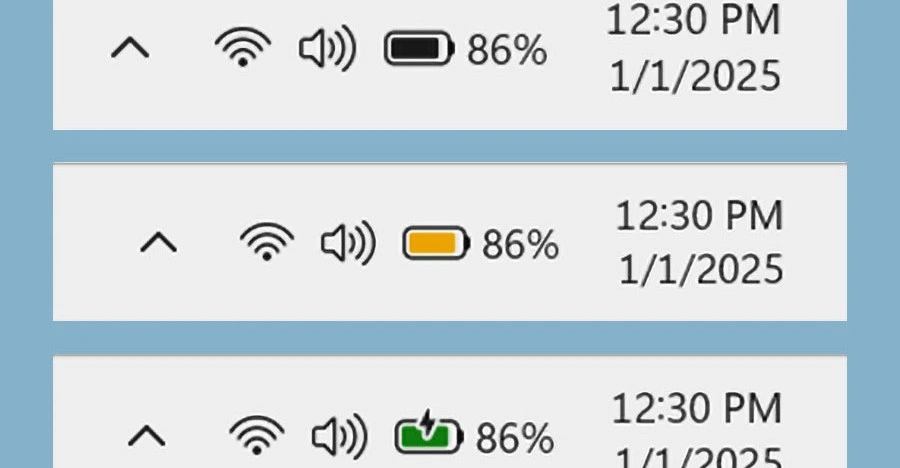
Microsoft has rolled out a redesigned battery icon for Windows 11's taskbar, replacing the static white symbol with color-coded visuals that instantly convey your laptop's power status. Green signals charging or full battery, red warns of critically low levels, and orange appears in battery saver mode. This update, part of the November 2025 and 25H2 releases, prioritizes quick readability for users on the go.
The change addresses a long-standing complaint: the original 2021 taskbar battery icon was hard to parse at a glance. Now, colors and a central percentage overlay make it intuitive. As Microsoft designers explained, they extended the icon's length, shifted overlays to the middle, and reduced clutter to highlight battery increments clearly. "You can just glance quickly and really within a glance you can tell what’s going on with your device," they noted.
How the New Icons Work in Practice
When plugged in and charging, the icon glows green with a lightning bolt. Fully charged? Solid green. Low battery triggers red, while battery saver (unplugged) shifts to orange. Users can toggle percentage display via settings, enhancing precision without sacrificing speed.
Real-world testing confirms the upgrade's value. One reviewer on two laptops praised how the vibrant icons "jump out" every glance, ending the need to hover or open menus. For hybrid workers juggling meetings and deadlines, this means less distraction and more focusvital when a dead battery mid-Zoom call ruins your day.
- Green + bolt: Actively charging.
- Solid green: Fully charged.
- Red: Critically lowplug in now.
- Orange: Battery saver active (unplugged).
The icon now occupies more taskbar space by design, allowing better differentiation between charge levels. Some users gripe about the footprint, but Microsoft insists it's essential for the feature's effectiveness.
Rollout Details and How to Get It
The colorful battery is in staged rollout, starting with Windows 11's November 11, 2025 update and expanding to 25H2 builds. Not everyone sees it yetit's server-side enabled, so even updated systems may wait. Check via Settings > Windows Update, then restart. If absent, it's likely pending your region's deployment.
Forums buzz with tips: Kenyan users spotted it January 9, 2026, while others troubleshoot via restarts or feedback hubs. Advanced users enable it early with registry tweaks, though Microsoft advises patience for stability.
Version 24H2 and 25H2 owners should verify updates. Hardware matters toosome configs lag. No force-enable method exists officially; it's wait-and-see.
Why This Matters for Everyday Users
Battery anxiety plagues laptop users, especially in a mobile-first world. This tweak humanizes Windows 11, making it feel responsive to real needs. No longer buried in notifications, power status lives front-and-center, potentially averting mishaps like sudden shutdowns during critical tasks.
Microsoft's iterative approach shines here. Since 2021, the taskbar evolved from criticized minimalism to practical powerhouse. This pairs with recent Start menu tweaks, signaling 25H2's polish.
Potential Drawbacks and User Reactions
Not universal praise: Some dislike the larger size or orange saver hue, seeking reversals. Microsoft Q&A threads show mixed feelings, with advisors urging updates over workarounds.
Space hogs on crowded taskbars could annoy minimalists, but options like auto-hide mitigate this. Overall, feedback leans positivevideos call it "long overdue" and "welcome," especially for tablets and laptops.
Broader Implications for Windows 11
This reflects Microsoft's push toward intuitive design in 25H2. By borrowing macOS-like glanceability, Windows closes UX gaps without overhauling the OS. Expect more refinements as rollout completes, possibly influencing future features like efficiency readouts.
For power users, it's a small win in a sea of updates. But for the average professional juggling deadlines, it's a quiet revolution: one less thing to worry about, letting you stay productive wherever work takes you. As batteries remain laptops' Achilles' heel, these icons ensure you're never caught off-guard.
This article was written by AI from reporting by theverge.com.