Finding a mobile browser that balances clean design with instant access to real-time information can be a frustrating challenge for active users. The latest Opera for Android update solves this by introducing a completely redesigned start page alongside a dedicated, feature-rich football hub just in time for the World Cup. This update targets mobile users who want a less cluttered browsing experience without sacrificing quick access to live sports updates and AI tools.
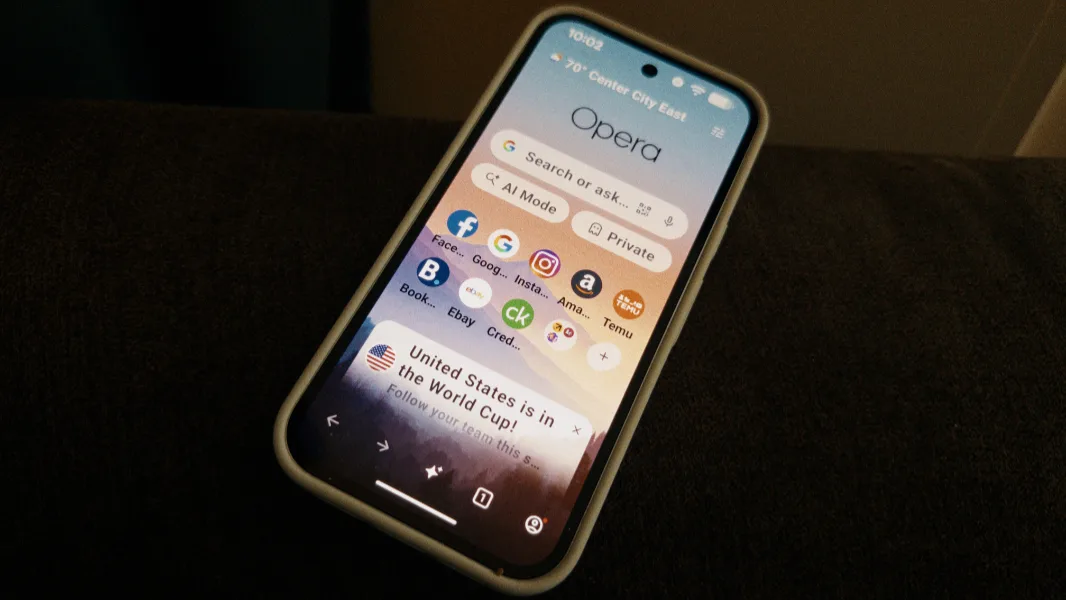
The start page is the gateway to the web, and the new design aims to make it feel significantly calmer and more spacious. The search box is now positioned front and center, complemented by rounded and softened Speed Dial icons that reduce visual noise. Additionally, the update introduces new warm wallpapers and direct links to AI Mode and private browsing.
The start page has always been the first thing you see when you open Opera - right after you install it, and every single time you come back. For us, that makes it one of the most important moments in your entire browsing experience.
- Shriya Sharma, Opera
To celebrate the upcoming World Cup, the browser now features a built-in live scores carousel that users can easily enable on their start page or access directly from the main menu. This hub allows fans to tap into any match to view starting lineups, real-time statistics, and live scores. Users can also customize push notifications to receive instant alerts for their favorite teams, match schedules, goals, and red cards.
Furthermore, the integration extends to player-specific pages on both the standard browser and Opera Mini. Shriya Sharma explained that "the news feed is powered by AI and adjusts to what you read over time." This allows users to quickly pull up verified player statistics and recent news to settle sports debates in seconds.
How to Enable the New Features in Opera for Android
Getting the redesigned start page and the football hub is straightforward. Follow these steps to update your browser and customize your experience:
- Open the Google Play Store on your device and search for the Opera for Android app to download the latest update.
- Launch the updated browser to view the newly designed, spacious start page with rounded Speed Dial icons.
- To activate the football hub, open the browser menu or start page settings and toggle on the live scores carousel.
- Select your favorite national teams within the hub to enable real-time push notifications for goals, cards, and match schedules.
The Smart Play for Mobile Browser Dominance
Integrating a highly specialized sports hub directly into a mobile browser is a clever tactical move by Opera. In a market dominated by Google Chrome, alternative browsers must offer distinct, high-value features to convince users to switch. By targeting football fans during one of the world's largest sporting events, Opera is leveraging temporary high-intensity interest to drive long-term user acquisition.
The inclusion of an AI-powered news feed and instant player statistics also highlights a broader trend in mobile software. Browsers are no longer just passive windows to the web; they are becoming active, curated content hubs. If Opera can successfully convert World Cup casuals into daily active users through these personalized features, it could carve out a highly loyal niche in the competitive Android ecosystem.