An advisor adds behavior around a ChatClient request, such as retrieving documents, adding conversation context, logging usage, or returning a response without calling the model. This Spring AI Advisors guide explores how the advisor chain works, how to configure built-in options, and how to write a custom call advisor using the OrderDesk example application.
Understand the Advisor Chain and Execution Order
A request passes through its registered advisors before reaching model execution. An advisor can inspect or change the request, continue the chain, and process the returned response. It can also stop the chain by supplying its own response:
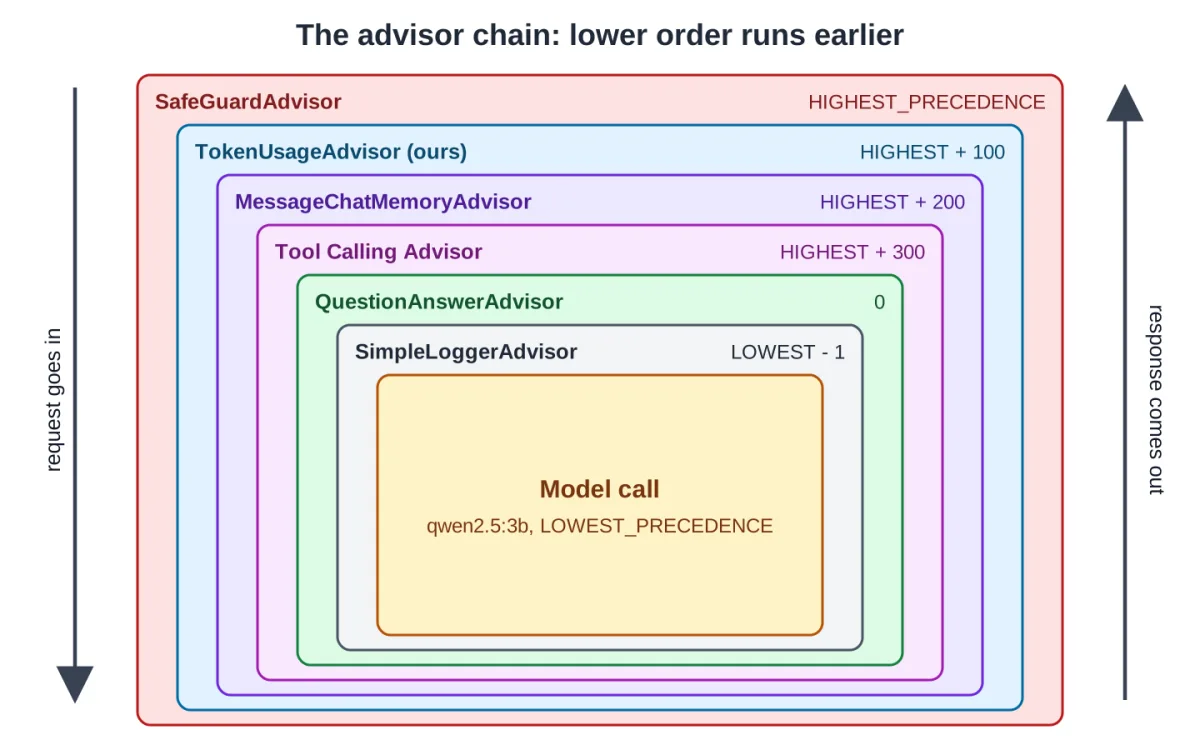
ChatClientResponse response = chain.nextCall(request); // the rest of the chainFor synchronous calls, logic before nextCall() runs before downstream processing, and logic after it runs as the response returns. The earliest advisor sees the request first and the downstream response last, unless an earlier step short-circuits execution. A ChatClient call passes through the advisors from the lowest order value to the highest, and the response comes back through them in reverse order.
Spring AI decides the order with getOrder(). Advisors implement Spring's Ordered interface, and an advisor with a lower order value runs earlier. Ordered.HIGHEST_PRECEDENCE is the smallest integer, so an advisor with it runs first. A CallAdvisor participates in synchronous calls, a StreamAdvisor in streaming calls, and an implementation can support both. The built-in advisors include:
| Advisor | Module | What it does | Default order |
|---|---|---|---|
| SafeGuardAdvisor | spring-ai-client-chat | Blocks a request that contains a listed word | 0 |
| MessageChatMemoryAdvisor | spring-ai-client-chat | Adds earlier messages of the conversation, saves the new ones | HIGHEST_PRECEDENCE + 200 |
| ToolCallingAdvisor | spring-ai-client-chat | Runs the tool-call loop; added automatically | HIGHEST_PRECEDENCE + 300 |
| QuestionAnswerAdvisor | spring-ai-vector-store-advisor | Adds matching documents from a vector store (RAG) | 0 |
| RetrievalAugmentationAdvisor | spring-ai-rag | Modular RAG: query rewrite, retrieval, augmentation | 0 |
| SimpleLoggerAdvisor | spring-ai-client-chat | Logs the request and the response at DEBUG level | 0 |
The Example App Setup
The OrderDesk application requires specific dependencies and properties. Add these dependencies to pom.xml to enable chat memory and a vector store:
<dependency>
  <groupId>org.springframework.ai</groupId>
  <artifactId>spring-ai-starter-model-chat-memory-repository-jdbc</artifactId>
</dependency>
<dependency>
  <groupId>org.hsqldb</groupId>
  <artifactId>hsqldb</artifactId>
  <scope>runtime</scope>
</dependency>
<dependency>
  <groupId>org.springframework.ai</groupId>
  <artifactId>spring-ai-vector-store-advisor</artifactId>
</dependency>
<dependency>
  <groupId>org.springframework.ai</groupId>
  <artifactId>spring-ai-markdown-document-reader</artifactId>
</dependency>
The spring-ai-starter-model-chat-memory-repository-jdbc dependency saves chat messages in a database table, while hsqldb provides the file-based database. The spring-ai-vector-store-advisor holds QuestionAnswerAdvisor and brings SimpleVectorStore, which keeps vectors in memory. Finally, spring-ai-markdown-document-reader reads policy files into the vector store.
Add these lines to application.properties:
# Chat memory is saved in a file database, so it survives a restart
spring.datasource.url=jdbc:hsqldb:file:./data/orderdesk
spring.ai.chat.memory.repository.jdbc.initialize-schema=always

# Embedding model for RAG (ollama pull nomic-embed-text)
spring.ai.ollama.embedding.options.model=nomic-embed-text

# Which vector store is active: simple (default, in memory), chroma, pgvector, redis or qdrant.
# The profiles application-chroma.properties and so on switch it.
spring.ai.vectorstore.type=simple
The spring.datasource.url points to the HSQLDB file, and initialize-schema=always creates the SPRING_AI_CHAT_MEMORY table at startup. The spring.ai.ollama.embedding.options.model names the model that turns text into vectors, and spring.ai.vectorstore.type=simple selects SimpleVectorStore. To see SimpleLoggerAdvisor output, add logging.level.org.springframework.ai.chat.client.advisor=DEBUG.
The Beans the Advisors Use
The advisors wrap supportClient, a ChatClient bean. Its system prompt holds the store's rules:
package com.howtodoinjava.orderdesk.chat;

import org.springframework.ai.chat.client.ChatClient;
import org.springframework.context.annotation.Bean;
import org.springframework.context.annotation.Configuration;

@Configuration
public class ChatClientConfig {

    static final String SUPPORT_RULES = """
        You are OrderDesk, the support assistant of an online store.
        Answer in at most three sentences.
        Delivery: Pune, Mumbai and Delhi in 2 days; every other city in India in 5 days.
        Delivery is free above INR 499; below that it costs INR 49.
        We do not deliver outside India.
        """;

    @Bean
    ChatClient supportClient(ChatClient.Builder builder) {
        return builder
            .defaultSystem(SUPPORT_RULES)
            .build();
    }

    @Bean
    ChatClient summaryClient(ChatClient.Builder builder) {
        return builder
            .defaultSystem("Summarize the customer's message in one line of at most 12 words.")
            .build();
    }
}
MessageChatMemoryAdvisor needs a ChatMemory bean. OrderDesk keeps the last 10 messages of each conversation in the JDBC table:
package com.howtodoinjava.orderdesk.memory;

import org.springframework.ai.chat.memory.ChatMemory;
import org.springframework.ai.chat.memory.MessageWindowChatMemory;
import org.springframework.ai.chat.memory.repository.jdbc.JdbcChatMemoryRepository;
import org.springframework.context.annotation.Bean;
import org.springframework.context.annotation.Configuration;

@Configuration
public class ChatMemoryConfig {

    // Keep the last 10 messages of each conversation (the default is 20)
    @Bean
    ChatMemory chatMemory(JdbcChatMemoryRepository repository) {
        return MessageWindowChatMemory.builder()
            .chatMemoryRepository(repository)
            .maxMessages(10)
            .build();
    }
}
QuestionAnswerAdvisor needs a VectorStore bean holding the store's policies. After adding the code, load the policies once using curl -X POST localhost:8080/ingest.
Build and Inspect the Advisor Chain
Step 1: Write a Custom Advisor
TokenUsageAdvisor logs the advisors in the chain, the token counts, and the time of every call:
package com.howtodoinjava.orderdesk.advisors;

import java.util.stream.Collectors;

import org.slf4j.Logger;
import org.slf4j.LoggerFactory;
import org.springframework.ai.chat.client.ChatClientRequest;
import org.springframework.ai.chat.client.ChatClientResponse;
import org.springframework.ai.chat.client.advisor.api.CallAdvisor;
import org.springframework.ai.chat.client.advisor.api.CallAdvisorChain;
import org.springframework.ai.chat.client.advisor.api.StreamAdvisor;
import org.springframework.ai.chat.client.advisor.api.StreamAdvisorChain;
import org.springframework.ai.chat.metadata.Usage;
import org.springframework.ai.chat.model.ChatResponse;

import reactor.core.publisher.Flux;

// Logs the time and the tokens of every ChatClient call that it advises
public class TokenUsageAdvisor implements CallAdvisor, StreamAdvisor {

    private static final Logger log = LoggerFactory.getLogger(TokenUsageAdvisor.class);

    private final int order;

    public TokenUsageAdvisor(int order) {
        this.order = order;
    }

    @Override
    public String getName() {
        return "TokenUsageAdvisor";
    }

    @Override
    public int getOrder() {
        return order;
    }

    @Override
    public ChatClientResponse adviseCall(ChatClientRequest request, CallAdvisorChain chain) {
        log.info("Chain: {}", chain.getCallAdvisors().stream()
            .map(a -> a.getName() + "(" + a.getOrder() + ")")
            .collect(Collectors.joining(" -> ")));
        long start = System.currentTimeMillis();

        ChatClientResponse response = chain.nextCall(request);   // the rest of the chain

        logUsage(response.chatResponse(), System.currentTimeMillis() - start);
        return response;
    }

    @Override
    public Flux<ChatClientResponse> adviseStream(ChatClientRequest request,
                                                 StreamAdvisorChain chain) {
        long start = System.currentTimeMillis();
        return chain.nextStream(request)
            .doOnNext(response -> {
                ChatResponse chatResponse = response.chatResponse();
                // only the last piece of a stream carries the token counts
                if (chatResponse != null && chatResponse.getMetadata().getUsage() != null
                        && chatResponse.getMetadata().getUsage().getTotalTokens() != null
                        && chatResponse.getMetadata().getUsage().getTotalTokens() > 0) {
                    logUsage(chatResponse, System.currentTimeMillis() - start);
                }
            });
    }

    private void logUsage(ChatResponse chatResponse, long millis) {
        Usage usage = chatResponse.getMetadata().getUsage();
        log.info("Tokens: prompt={}, completion={}, total={}, time={} ms",
            usage.getPromptTokens(), usage.getCompletionTokens(), usage.getTotalTokens(), millis);
    }
}
An advisor implements CallAdvisor for synchronous requests or StreamAdvisor for stream() requests. Both interfaces require getName() and getOrder(). The chain.getCallAdvisors() method returns the whole chain sorted by order. To change the request, build a new one with request.mutate() and pass it to chain.nextCall().
Step 2: Chain the Built-in Advisors
Four built-in advisors are added next to the custom one in AdvisorChatController. The initial version left every built-in advisor at its default order:
supportClient.prompt()
    .user(question)
    .advisors(safeGuardAdvisor, tokenUsageAdvisor, memoryAdvisor,
        questionAnswerAdvisor, new SimpleLoggerAdvisor())
    .advisors(a -> a.param(ChatMemory.CONVERSATION_ID, customerId))
    .call()
    .content();
The getOrder() method determines execution priority rather than the order of arguments supplied to advisors(). Equal values do not establish a reliable ordering contract.
Step 3: Find the Two Problems
Two issues emerged with the default setup. First, when a customer shared a card number, SafeGuardAdvisor blocked the request, but the card number was already saved because the memory advisor ran before it. Second, a returning customer asked for her name and the return policy, but the model ignored the history. The default QuestionAnswerAdvisor template instructs the model to use only the provided context and not prior knowledge.
Step 4: Set the Order and the Template
The revised configuration assigns explicit priorities and changes the RAG template to permit both document context and conversation history:
package com.howtodoinjava.orderdesk.advisors;

import java.util.List;

import org.springframework.ai.chat.client.ChatClient;
import org.springframework.ai.chat.client.advisor.MessageChatMemoryAdvisor;
import org.springframework.ai.chat.client.advisor.SafeGuardAdvisor;
import org.springframework.ai.chat.client.advisor.SimpleLoggerAdvisor;
import org.springframework.ai.chat.client.advisor.api.Advisor;
import org.springframework.ai.chat.client.advisor.vectorstore.QuestionAnswerAdvisor;
import org.springframework.ai.chat.memory.ChatMemory;
import org.springframework.ai.chat.prompt.PromptTemplate;
import org.springframework.ai.vectorstore.SearchRequest;
import org.springframework.ai.vectorstore.VectorStore;
import org.springframework.beans.factory.annotation.Qualifier;
import org.springframework.core.Ordered;
import org.springframework.web.bind.annotation.GetMapping;
import org.springframework.web.bind.annotation.RequestParam;
import org.springframework.web.bind.annotation.RestController;

import reactor.core.publisher.Flux;

@RestController
public class AdvisorChatController {

    // The default QuestionAnswerAdvisor template says "not prior knowledge",
    // so the model ignored the chat history; this one allows both
    static final PromptTemplate POLICY_AND_HISTORY = new PromptTemplate("""
        {query}

        Answer from the conversation so far and from the policy text below.
        ---------------------
        {question_answer_context}
        ---------------------
        If neither of them has the answer, say that you don't know.
        """);

    private final ChatClient supportClient;
    private final List<Advisor> advisors;
    private final TokenUsageAdvisor tokenUsageAdvisor =
        new TokenUsageAdvisor(Ordered.HIGHEST_PRECEDENCE + 100);

    AdvisorChatController(@Qualifier("supportClient") ChatClient supportClient,
                          ChatMemory chatMemory, VectorStore vectorStore) {
        this.supportClient = supportClient;
        this.advisors = List.of(
            // 1. block sensitive input before anything else sees or stores it
            new SafeGuardAdvisor(List.of("password", "card number", "CVV"),
                "Please don't share payment details or passwords in chat.",
                Ordered.HIGHEST_PRECEDENCE),
            // 2. measure the whole call, including memory and RAG
            tokenUsageAdvisor,
            // 3. add the conversation history (default order HIGHEST_PRECEDENCE + 200)
            MessageChatMemoryAdvisor.builder(chatMemory).build(),
            // 4. add the policy sections that match the question
            QuestionAnswerAdvisor.builder(vectorStore)
                .searchRequest(SearchRequest.builder().topK(3).similarityThreshold(0.5).build())
                .promptTemplate(POLICY_AND_HISTORY)
                .order(0)
                .build(),
            // 5. log the final prompt, just before the model call
            new SimpleLoggerAdvisor(Ordered.LOWEST_PRECEDENCE - 1));
    }

    @GetMapping("/advisors/ask")
    String ask(@RequestParam String customerId, @RequestParam String question) {
        return supportClient.prompt()
            .user(question)
            .advisors(advisors)
            .advisors(a -> a.param(ChatMemory.CONVERSATION_ID, customerId))
            .call()
            .content();
    }

    @GetMapping("/advisors/stream")
    Flux<String> stream(@RequestParam String question) {
        return supportClient.prompt()
            .user(question)
            .advisors(tokenUsageAdvisor)
            .stream()
            .content();
    }
}
SafeGuardAdvisor now takes the blocked words, a custom message, and Ordered.HIGHEST_PRECEDENCE. The template keeps {query} and {question_answer_context} placeholders. SearchRequest returns at most 3 policy sections with a similarity score of at least 0.5. Moving the guard to the outermost position prevents blocked requests from reaching memory.
Testing with a new customer, Ravi, confirms the fixes:
curl -G localhost:8080/advisors/ask --data-urlencode "customerId=ravi" --data-urlencode "question=Hi, I am Ravi. How many days do I have to return a jacket?"
curl -G localhost:8080/advisors/ask --data-urlencode "customerId=ravi" --data-urlencode "question=What is my name, and how long did you say I have?"
curl -G localhost:8080/advisors/ask --data-urlencode "customerId=ravi" --data-urlencode "question=My card number is 4111 1111 1111 1111, can you save it?"
The first answer uses the policy section added by QuestionAnswerAdvisor. The second answer uses the history, as no policy section scored 0.5, and the new template allowed the model to use the conversation. The third request returns in 13 milliseconds because SafeGuardAdvisor returned before the memory advisor ran, leaving the card number unsaved.
Step 5: Advise a Streaming Call
The stream() method passes the tokenUsageAdvisor instance to a stream() call. Streaming produces multiple response fragments, and providers commonly report aggregate usage near completion. The custom advisor checks for nonzero totals before logging, as not every provider supplies the same usage fields.
Common Traps
- Equal Orders: Advisors with the same order do not run in list order. Set an order on every advisor whose position matters.
- Guards That Run Too Late: Place checks before the processing they protect. Verify that sensitive data is not captured by earlier logging.
- Blocking Code in a Stream: Avoid blocking work on Reactor event-loop threads. If a custom streaming advisor calls a blocking database, use an appropriate scheduler.
- Default Advisors Run Everywhere: The
defaultAdvisors()method adds advisors to every request made through that client. Add advisors per request unless every request needs them. - Templates That Fight Each Other: Each advisor that adds text to the prompt also adds instructions. Read the final prompt in the
SimpleLoggerAdvisorlog when combining advisors.
Advanced Advisor Concepts
While both advisors and Spring AOP aspects can wrap execution, ChatClient advisors work specifically with structured prompt, response, and advisor-context objects. Advisors pass data to each other through the advisor context, a Map on the request and the response. For example, QuestionAnswerAdvisor puts found documents under QuestionAnswerAdvisor.RETRIEVED_DOCUMENTS, which a later advisor can read from response.context().
An advisor can skip the model call entirely. If adviseCall() returns a response without calling chain.nextCall(), the model is never called, which is how SafeGuardAdvisor operates. To view the final prompt, place SimpleLoggerAdvisor at Ordered.LOWEST_PRECEDENCE - 1 and enable DEBUG logging. Note that Spring AI 1.0 renamed CallAroundAdvisor and StreamAroundAdvisor to CallAdvisor and StreamAdvisor, and AdvisedRequest to ChatClientRequest.
Managing the Advisor Chain
Registered advisors form an ordered processing chain for the execution modes they implement. Use explicit priorities where order matters, and check the final request when combining memory, retrieval, tools, guards, and logging. Because an advisor can short-circuit the chain, downstream code must not assume every request reaches the model.
This article was written by AI from reporting by howtodoinjava.com.