What is a Power BI Center of Excellence?
A Power BI Center of Excellence (CoE) serves as the strategic hub for organizations aiming to maximize Microsoft's Power BI platform. It establishes best practices, enforces governance, and accelerates adoption. Unlike ad-hoc implementations, a CoE provides structure to handle data analytics at enterprise scale, preventing silos and ensuring compliance.
Why Organizations Need a Power BI CoE
Power BI, part of the Microsoft Power Platform, enables interactive dashboards and reports from diverse data sources. However, without oversight, teams risk inconsistent data models, security gaps, and redundant efforts. A CoE addresses these by centralizing expertise. It promotes self-service analytics while maintaining control, allowing business users to explore data without IT bottlenecks.
- Standardizes report development and data modeling.
- Implements governance frameworks for data quality and access.
- Drives training and change management for widespread adoption.
Core Components of a Power BI CoE
Effective CoEs feature dedicated teams with roles like architects, admins, and analysts. They leverage Power BI's built-in tools such as workspaces, apps, and deployment pipelines.
Governance Framework
Governance is foundational. CoEs define policies for data refresh schedules, row-level security, and sensitivity labels. They use Power BI Premium capacities for scalable performance and auditing via activity logs.
Adoption Strategies
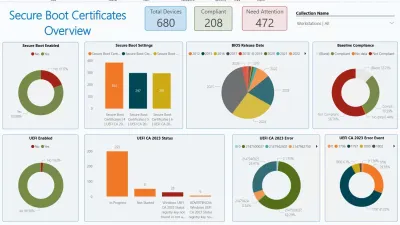
To boost usage, CoEs create starter kitspre-built templates for common scenarios like sales dashboards. They run workshops, certify power users, and monitor adoption metrics through Power BI usage reports.
Tooling and Automation
CoEs integrate with Microsoft Purview for data lineage and use PowerShell scripts for bulk operations. They also employ the Power BI REST API for custom monitoring dashboards tracking dataset health and report performance.
Building Your Power BI CoE: Step-by-Step
Start with a maturity assessment to gauge current capabilities. Assemble a cross-functional team including IT, business stakeholders, and data experts. Develop a roadmap covering quick wins like tenant settings optimization and long-term goals like AI visuals integration.
- Phase 1: Set up admin portals and licensing.
- Phase 2: Roll out governance playbooks.
- Phase 3: Launch community forums and feedback loops.
Microsoft provides free CoE Starter Kit, a set of Power BI reports and templates downloadable from the Power BI community. This accelerates setup by offering pre-configured monitors for workspace utilization and data gateway health.
Real-World Impact and Challenges
Organizations with mature CoEs report 3x faster report deployment and 40% higher user satisfaction. They enable advanced features like composite models and incremental refresh for massive datasets. Challenges include resistance to standards and skill gaps, mitigated by ongoing training.
In hybrid environments, CoEs ensure seamless integration with on-premises SQL Server via gateways. For global firms, they manage multi-tenant setups and localization.
Future-Proofing with Power BI CoE
As Power BI evolves with Fabric integration, CoEs position organizations for unified analytics. They prepare for AI-driven insights via Copilot in Power BI, ensuring governed access to natural language queries.
Investing in a CoE transforms Power BI from a tool into a strategic asset, empowering data-driven decisions enterprise-wide.
This article was written by AI from reporting by c-sharpcorner.com.