

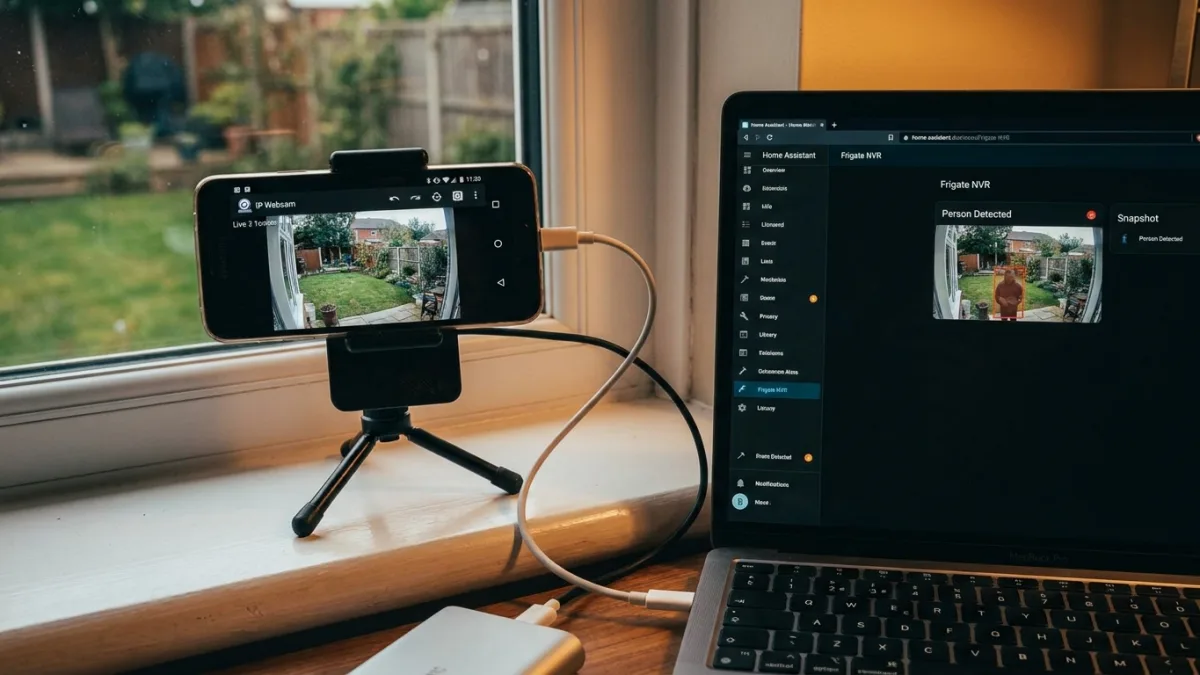
Paying $60 a year for a Ring subscription just to save video clips is a frustrating reality for many smart home users. However, you can completely bypass these recurring fees and Amazon's cloud servers by repurposing an old Android phone into a fully functional, locally hosted security camera. This approach not only saves money but also keeps your private footage entirely within your own network.
This guide is designed for privacy-conscious users and smart home enthusiasts who want to eliminate subscription costs while maintaining full control over their data. By combining a free application with local smart home software, you can achieve better person-detection capabilities than commercial alternatives without spending a dime on monthly plans.
How to Set Up Your Android Security Camera
The setup process requires minimal effort and works with almost any device running Android 8.0 or newer. You will need a phone with a functional camera, a steady Wi-Fi connection, and a permanent power source.
- Install the free IP Webcam app from the Google Play Store. Avoid alternatives like AlfredCamera, as IP Webcam does not route your video through third-party servers.
- Open the app, adjust the video quality and resolution to match your network's bandwidth, and tap Start Server. The app will display a local IP address and port, typically resembling 192.168.1.x:8080.
- Assign a static IP address to the phone through your router's admin panel to ensure your smart home system never loses the connection after a reboot.
- Strip down the phone's software to manage heat and battery health. Disable unnecessary background apps, turn off automatic updates, and configure the screen to stay off while charging.
- Navigate to your Home Assistant dashboard, go to Devices and Services, and add the Android IP Webcam integration using the static IP address you created.
Adding Smart Detection with Frigate
Once connected, Home Assistant automatically discovers the camera feed alongside the phone's battery, light, and motion sensors. A live MJPEG feed will immediately appear on your dashboard. However, to replicate Ring's premium smart alerts, you need to process the video locally.
By feeding the phone's RTSP stream into Frigate - an open-source network video recorder (NVR) that runs in Docker - you can enable real-time object detection. Frigate specifically identifies people rather than triggering false alarms every time a leaf blows past the lens. Once these person-detection events are integrated into Home Assistant, you can build custom automations, such as sending a push notification with a snapshot or turning on porch lights when someone approaches.
Hardware Limits and Local Storage
While this setup is highly capable, smartphone cameras are not inherently designed for 24/7 continuous operation. Heat management and constant charging cycles will eventually degrade older batteries. Additionally, this DIY solution is not weatherproof, making it best suited for indoor window views, garages, or covered entryways.
Because the system is entirely local, your storage capacity depends on your own hardware. You will need a dedicated network drive or sufficient disk space on your Home Assistant server to store more than a few days of video clips.
The Hidden Cost of Cloud Dependency
The transition from a $5 monthly Ring plan to a localized Android setup highlights a growing friction point in consumer technology: the hardware-as-a-service (HaaS) model. Companies increasingly sell affordable hardware specifically to lock users into perpetual cloud subscriptions. Repurposing an old device is not just a cost-saving measure; it is a blueprint for digital sovereignty that reclaims ownership over personal data.
Furthermore, integrating tools like Frigate demonstrates that local, consumer-grade processing can now match or exceed cloud-based AI in both latency and privacy. As smart home ecosystems mature, the reliance on external servers for basic object detection is becoming a liability rather than a feature. This shift suggests that the next premium standard in smart home tech will not be better cloud AI, but rather systems that process everything entirely on the edge.
