Microsoft is finally fixing one of the most persistent frustrations in Windows 11 by rolling out a fully customizable context menu for File Explorer. The update, announced for Windows Insiders on August 17, eliminates the sluggish, cluttered right-click experience often caused by poorly optimized third-party application extensions.
File Explorer itself is receiving a broader modernization push to reduce freezes, hangs, and interface flashes. Microsoft has implemented performance profiling to ensure the application launches faster, while background synchronization will no longer interrupt active file rename operations. Additionally, case-only filename changes will now be displayed immediately.
How to Customize the New Right-Click Menu
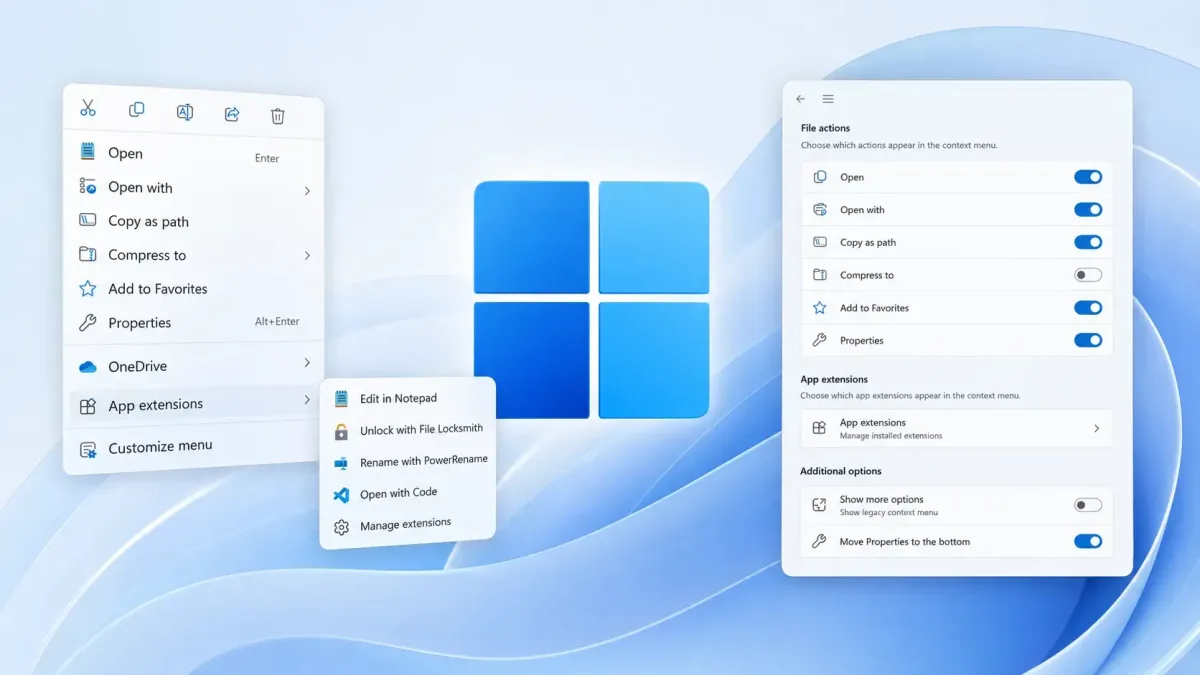
The highlight of this release is a leaner default configuration that loads significantly faster due to behind-the-scenes engineering changes. To manage these options, users can click a new "Customize" button at the bottom of the context menu, which opens a dedicated page within the Personalization section of the Settings app.
From this menu, users gain granular control over both native Windows commands and third-party application extensions. Key customization features include:
- Toggling built-in Windows commands like Send to, Create shortcut, and Print.
- Managing third-party app extensions by forcing them into the main menu, relegating them to a submenu, or hiding them entirely.
- Restoring classic Windows 10 layout options, such as displaying Cut, Copy, Paste, Rename, Delete, and Share as inline text commands rather than icons.
- Moving the Properties option back to the absolute bottom of the menu.
Workflow and Navigation Upgrades
Beyond the right-click menu, Microsoft is introducing several quality-of-life improvements for multi-folder workflows. The File Explorer address bar now accepts complex path formats, including those containing quotation marks and double backslashes.
Users can now middle-click on folders directly from the address bar or the Home page to instantly open them in new tabs. Furthermore, the Home view will now remember expanded and collapsed sections between sessions, and file sizes are displayed in standard KB, MB, and GB units within a reorganized Details pane.
The End of the "Show More Options" Era
Microsoft’s initial attempt to simplify the Windows 11 context menu was a classic case of form over function. By hiding essential tools behind the infamous "Show more options" button, the company alienated power users and added unnecessary friction to basic file management. Moving these controls into a native Settings menu is a clear admission that the one-size-fits-all approach failed.
More importantly, this update acts as a stealth performance and security upgrade. Context menus historically load entries registered by every installed application, creating processing overhead that slows down the OS. By giving users a built-in kill switch to hide or demote third-party shell integrations, Microsoft is empowering administrators to sandbox resource-heavy extensions without needing to edit the Windows Registry.
This article was written by AI from reporting by gbhackers.com.