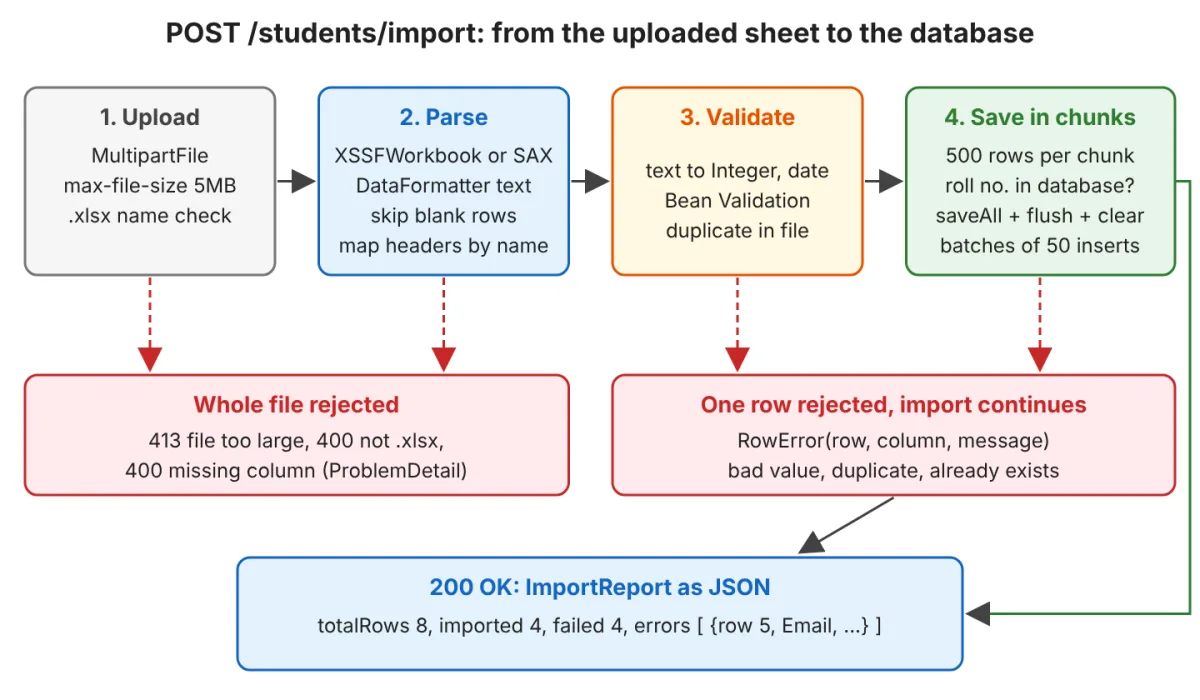
Developers building enterprise applications frequently face the challenge of importing Excel files into a database without crashing the server or corrupting data. A standard Spring Boot implementation must handle file uploads, read complex cell formats, validate individual rows, and save the clean data while reporting specific errors back to the user.
This process requires a robust architecture that can process an .xlsx file - which is essentially a zip archive of XML files - through multiple validation layers. By leveraging the Apache POI library, developers can extract data efficiently, map headers dynamically, and execute batch inserts using Spring Data JPA.
How Does an Excel Import Work in Spring Boot?
An import endpoint processes the file through four distinct steps: accepting the upload, reading the cells, validating the data, and saving the valid rows. A problem with the file itself stops the import entirely, returning a 4xx HTTP status. However, a problem within a single row merely generates an error report, allowing the rest of the valid rows to be saved.
Apache POI offers two primary methods to read a sheet. The standard XSSFWorkbook builds an object for every row and cell in memory, which is ideal for smaller files requiring random access or formula evaluation. Conversely, the XSSF event API parses the sheet XML using SAX (Simple API for XML), keeping only the current row in memory, making it essential for large files.
Setting Up Maven Dependencies
Spring Boot does not manage the Apache POI version automatically, so it must be explicitly defined in the project configuration. The poi-ooxml module is required for handling .xlsx files and automatically pulls in the core POI dependencies.
<dependency>
  <groupId>org.springframework.boot</groupId>
  <artifactId>spring-boot-starter-webmvc</artifactId>
</dependency>
<dependency>
  <groupId>org.springframework.boot</groupId>
  <artifactId>spring-boot-starter-data-jpa</artifactId>
</dependency>
<dependency>
  <groupId>org.springframework.boot</groupId>
  <artifactId>spring-boot-starter-validation</artifactId>
</dependency>
<dependency>
  <groupId>org.apache.poi</groupId>
  <artifactId>poi-ooxml</artifactId>
  <version>5.5.1</version>
</dependency>
The complete project utilizes Spring Boot 4.1.1, Java 25, Apache POI 5.5.1, and Hibernate 7.4.5. Note that in Spring Boot 4, the web starter is officially named spring-boot-starter-webmvc.
The Entity and Header Mapping
The database entity must be structured to handle batch inserts efficiently. Using a sequence generator for the ID is critical, as relying on an identity column disables Hibernate's insert batching capabilities.
@Entity
public class Student {
  @Id
  @GeneratedValue(strategy = GenerationType.SEQUENCE)
  @SequenceGenerator(sequenceName = "student_seq", allocationSize = 50)
  private Long id;

  @Column(unique = true, nullable = false)
  private String rollNumber;
  private String name;
  private String email;
}
Instead of validating the entity directly, a separate record holds the converted row alongside its Excel row number. This allows Bean Validation constraints to be applied before the data ever reaches the database entity.
public record StudentRow(
    int rowNumber,
    @NotBlank @Pattern(regexp = "\\d{1,6}", message = "must be a number with up to 6 digits") String rollNumber,
    @NotBlank @Email String email) {
}
Uploading the File With MultipartFile
Spring handles file uploads via the MultipartFile interface. The controller must verify the file extension, copy the upload to a temporary file, and pass that physical file to the service layer.
@PostMapping(value = "/students/import", consumes = MediaType.MULTIPART_FORM_DATA_VALUE)
public ImportReport importStudents(@RequestParam("file") MultipartFile file,
    @RequestParam(defaultValue = "false") boolean streaming) {

  String fileName = file.getOriginalFilename();
  if (file.isEmpty() || fileName == null || !fileName.toLowerCase().endsWith(".xlsx")) {
    throw new InvalidFileException("Upload a non-empty .xlsx file");
  }
  Path upload = null;
  try {
    upload = Files.createTempFile("students-", ".xlsx");
    file.transferTo(upload);
    return importService.importStudents(upload, reader, false);
  } catch (IOException | UnsupportedFileFormatException e) {
    throw new InvalidFileException("Not a readable .xlsx file");
  } finally {
    deleteQuietly(upload);
  }
}
It is crucial to provide Apache POI with a physical file rather than an InputStream. Passing an input stream forces POI to buffer the entire file in memory, which drastically increases heap consumption.
Reading Cells With DataFormatter
Reading a cell with the incorrect getter method is the most common cause of crashes in Excel imports. For example, calling getStringCellValue() on a numeric cell throws an IllegalStateException.
DataFormatter formatter = new DataFormatter();
formatter.formatCellValue(roll);           // "101"
formatter.formatCellValue(marks);          // "85.5"
formatter.formatCellValue(date);           // "6/15/24"
The DataFormatter class solves this by returning the exact text Excel displays, regardless of the underlying cell type. For dates, extending DataFormatter to return standard ISO formats (like "2024-06-15") ensures consistent parsing later in the pipeline.
Validating Rows and Reporting Errors
Each row undergoes a two-step validation process. First, text values are converted to their target types (like Integer or LocalDate). If conversion fails, the error is recorded. Next, the Bean Validator checks the constraints on the record.
for (ConstraintViolation<StudentRow> violation : validator.validate(student)) {
  String column = StudentColumn.headerOf(violation.getPropertyPath().toString());
  if (!badColumns.contains(column)) {
    errors.add(new RowError(row.rowNumber(), column, violation.getMessage()));
  }
}
The final output is a JSON report detailing the total rows processed, the number of successful imports, and a specific array of errors mapped to exact row numbers and column headers.
Handling Duplicates and Batch Inserts
To prevent database constraint violations, the system must check for duplicate identifiers both within the uploaded file and against existing database records. A single query per chunk of 500 rows can efficiently retrieve existing identifiers.
spring.jpa.properties.hibernate.jdbc.batch_size=50
spring.jpa.properties.hibernate.order_inserts=true
By enabling JDBC batching in the application properties, Hibernate groups multiple inserts into a single database call. The service saves valid rows in chunks, calling flush() to execute the batch and clear() to detach entities, preventing memory bloat.
Reading Large Files With the SAX Event API
For massive datasets, the standard XSSFWorkbook consumes too much memory. The XSSF event API streams the XML content, processing one cell at a time through a SheetContentsHandler.
XSSFReader reader = new XSSFReader(pkg);
ReadOnlySharedStringsTable strings = new ReadOnlySharedStringsTable(pkg);
try (InputStream sheet = reader.getSheetIterator().next()) {
  XMLReader parser = XMLHelper.newXMLReader();
  parser.setContentHandler(new XSSFSheetXMLHandler(
      reader.getStylesTable(), strings, new RowCollector(rows), new IsoDateFormatter(), false));
  parser.parse(new InputSource(sheet));
}
This streaming approach drastically reduces the memory footprint, making it possible to process hundreds of thousands of rows on constrained server environments.
Limiting the Upload Size and Testing
Spring Boot restricts uploads to 1MB per file by default. To accommodate larger Excel sheets, these limits must be increased in the configuration properties.
spring.servlet.multipart.max-file-size=5MB
spring.servlet.multipart.max-request-size=6MB
Testing the import logic is handled via MockMvc. Instead of storing binary files in the repository, the test suite generates the Excel bytes dynamically using POI, ensuring the tests remain fast and reliable.
The Memory Trap Destroying Cloud Deployments
The most critical revelation in this architecture is the staggering memory disparity between reading an Excel file via an InputStream versus a physical File. When processing a 3 MB file containing 100,000 rows, the standard XSSFWorkbook demands a massive 768 MB of heap memory. This is a silent killer for containerized Spring Boot applications running in Kubernetes, where memory limits are strictly enforced and exceeding them results in immediate OOM (Out of Memory) pod terminations.
Even when developers switch to the highly efficient SAX event API, they often fall into a secondary trap: passing an InputStream to the OPCPackage. Doing so forces Apache POI to unzip every XML part into byte arrays first, spiking memory usage to 96 MB. By writing the multipart upload to a temporary physical file on disk and passing that file reference to the SAX parser, the memory footprint plummets to an astonishing 16 MB. This 97% reduction in memory consumption is the difference between a stable enterprise application and one that crashes every time the HR department uploads a quarterly report.