While Microsoft Excel offers an intuitive interface for basic data entry, performing complex statistical mathematics often forces users to rely on expensive, standalone software. Analyse-it for Microsoft Excel eliminates this friction by embedding a comprehensive suite of dataset management and statistical tests directly into your existing worksheets. This add-in transforms standard spreadsheets into powerful analytical environments, sparing researchers and analysts the hassle of exporting data to third-party programs.
How to Access the Statistical Tools
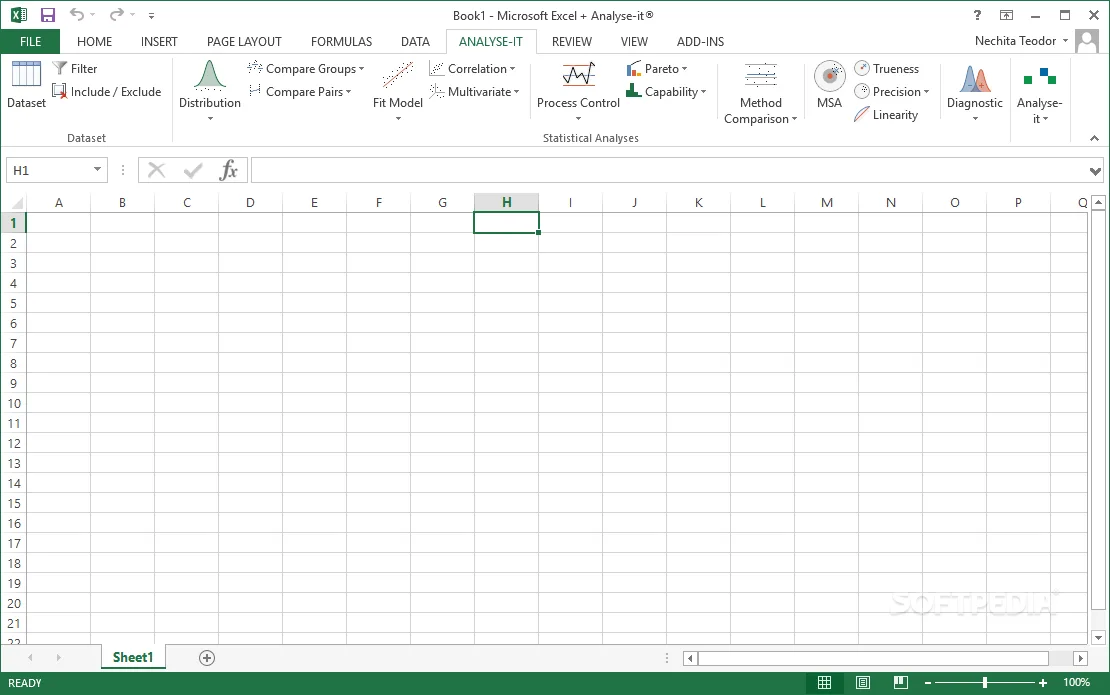
The integration process is designed to be completely frictionless. After running the wizard-based setup, the software automatically launches alongside Microsoft Excel. Users will immediately notice a dedicated Analyse-it tab added to the main ribbon, providing instant access to the new toolset.
To streamline workflows, the add-in categorizes its commands based on their analytical purpose. Key functionalities include:
- Distribution: Tools to describe and visualize data spreads, including basic Gaussian curves and differential distributions.
- Compare groups: Features designed to estimate and evaluate differences between multiple datasets.
- Compare pairs: Dedicated functions for testing hypotheses and rendering large amounts of data into easy-to-understand summaries.
Broad Compatibility and Built-in Support
One of the most significant advantages of this add-in is its extensive backward compatibility. Analyse-it supports every version of MS Excel from 1997 through 2016, ensuring that users on legacy systems can still access modern statistical plotting structures.
Because statistical analysis requires specialized knowledge, the developers have included extensive built-in documentation. This ensures that even users who are relatively new to advanced mathematics can effectively utilize the customizable plots and descriptive statistics without needing external tutorials.
The Efficiency of Native Spreadsheet Analysis
The real value of Analyse-it lies in its ability to eliminate the data export tax. When analysts are forced to migrate datasets from Excel into dedicated statistical packages, they risk formatting corruption and waste valuable time. By keeping the entire workflow native to the Excel environment, this add-in directly translates into faster project turnaround times.
Furthermore, its broad compatibility with legacy Excel versions makes it an essential tool for institutions that have not yet migrated to cloud-based Microsoft 365 environments. It proves that powerful data science and hypothesis testing do not always require the latest hardware or expensive monthly subscriptions, but rather smart integrations that maximize existing software.