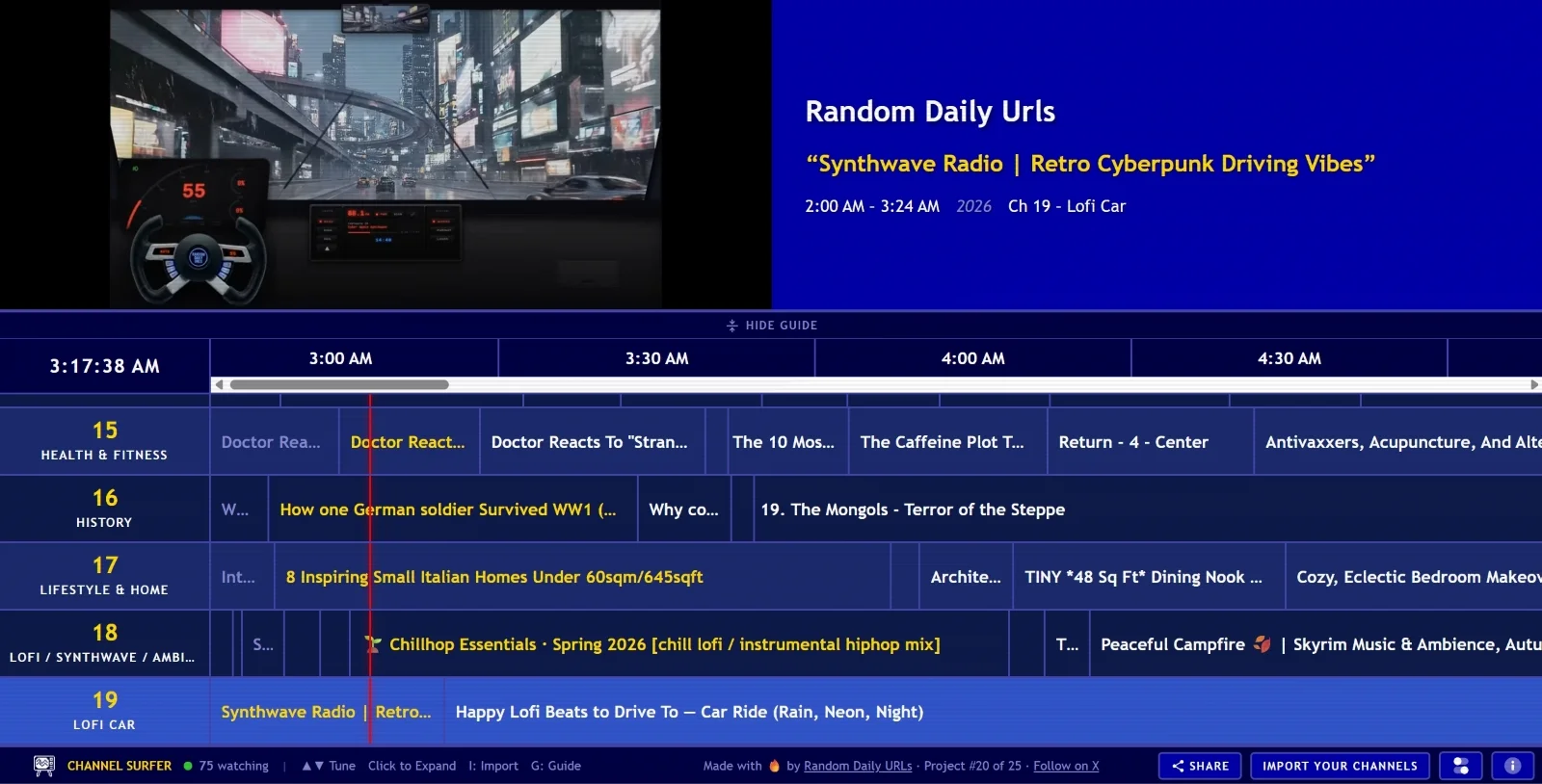
If you are tired of endless scrolling and choice paralysis on YouTube, a new web tool called Channel Surfer offers a nostalgic solution. Created by developer Steven Irby, this free interface transforms your YouTube subscriptions into a classic 2000s-style cable TV guide. This guide will show you how to use Channel Surfer to rediscover the joy of channel surfing without algorithms dictating your choices.
This guide is designed for avid YouTube viewers who struggle with decision fatigue and want a simpler way to discover content. By following these steps, you can bypass the standard recommendation algorithm and enjoy a randomized viewing experience based on your actual interests. The tool removes the pressure of finding the perfect video, replacing it with the simple joy of seeing what happens to be broadcasting right now.
Channel Surfer is project number 20 out of 25 that Irby intends to release, focusing on building "weird, random internet things." The platform operates with zero logins, zero ads, and zero bloat. It completely bypasses the official YouTube API, stripping away standard interface elements like comments, sidebars, and related video suggestions to maintain an authentic linear television feel.
Step-by-Step Guide to Channel Surfing
- Access the Web Interface: Navigate to the Channel Surfer website to immediately view the default 2000s-style cable television guide.
- Explore Default Channels: Browse through the pre-set categories if you want immediate content without any setup. These default channels cover topics like AI, Books, Auto & Garage, City & Infrastructure, Comedy, Cooking, Health & Fitness, Movies, and Music.
- Import Your Subscriptions: Use the provided bookmarklet tool to securely import your personal YouTube subscription list. This process allows you to personalize the feed without needing to create an account or grant invasive API permissions.
- Start Flipping Channels: Navigate through the randomized, recently released videos from your imported subscriptions. Enjoy a clean, distraction-free interface that mimics the classic television experience.
My Take
The rise of tools like Channel Surfer highlights a growing consumer frustration with algorithmic content feeds and the paradox of choice. By stripping away the standard platform "bloat" - such as comments and related video sidebars - Irby's tool successfully taps into the nostalgic simplicity of linear television. While it will not replace targeted searching for specific tutorials or reviews, it serves as a perfect palate cleanser for decision fatigue. The fact that it operates without requiring an account or pushing ads makes it a highly user-centric alternative for casual viewing.
Frequently Asked Questions
Does Channel Surfer require a YouTube login?
No, the tool operates entirely without logins. You do not need to create an account or sign in to use the web interface.
Are there ads on the Channel Surfer platform?
No. The tool strips away standard platform bloat and does not push YouTube ads, offering a clean viewing experience.
How does it access my subscriptions without an API?
The tool uses a simple bookmarklet to import your subscription data locally, ensuring your privacy is maintained without relying on official API integrations.
This article was written by AI from reporting by androidpolice.com.