AI tools can transform how you design your work-from-home environment by analyzing your space and recommending furniture, lighting, and ergonomic solutions tailored to your specific needs. Whether you're working from your couch, backyard, or bathtub, AI assistants like Claude, ChatGPT, and Gemini can generate personalized setup recommendations that maximize both productivity and comfort.
How to Set Up Your Mobile Work-From-Home Space
The flexibility of remote work means you can work from virtually anywhere in your home. To create a truly mobile setup that adapts to different locations, follow these steps:
- Photograph multiple spaces in your home where you'd like to work. This gives AI tools a clear visual reference to understand your environment, lighting conditions, and available space.
- Upload your photos to Claude, ChatGPT, or Gemini and describe your goal (e.g., "I want a mobile work setup I can move between my backyard, bedroom, and living room"). AI tools will analyze each space's unique characteristics and constraints.
- Request a portable equipment list that works across all your chosen locations. This ensures you invest in versatile gear rather than location-specific items.
- Prioritize essentials from the AI recommendations: laptop stand, wireless keyboard, noise-canceling headphones, external microphone, and portable battery pack. These items form the foundation of any mobile setup and are lightweight enough to move between spaces.
- Add location-specific accessories based on AI suggestions. For outdoor work, consider a shade umbrella to reduce screen glare; for bed-based work, add a multiport hub and extension cord for device charging.
Claude AI specifically recommended external microphones, ring lights, laptop stands, Wi-Fi extenders, and noise-canceling earbuds for a nomadic setup. ChatGPT suggested practical touches like positioning greenery behind you for professional video calls and using a shade umbrella to prevent laptop screen glare in outdoor settings.
Creating a Comfortable Bed-Based Work Setup
If you prefer working from bed - a common choice during tight deadlines - AI tools can help you maintain productivity while protecting your physical health:
- Upload a photo of your bed to your chosen AI tool and explain your work habits (e.g., "I work from bed under covers with pillows"). This helps AI understand your comfort preferences and physical constraints.
- Request ergonomic solutions that don't sacrifice comfort. AI tools will suggest adjustable laptop stands, supportive pillows, and desk accessories that reduce strain on your spine.
- Add a multiport hub and extension cord to your setup, as recommended by Gemini. This prevents you from constantly reaching for outlets and keeps your charging cables organized within arm's reach.
- Invest in a lap desk or bed tray to create a stable work surface. This elevates your laptop to eye level and reduces neck strain during long work sessions.
- Position your monitor or laptop screen at a 15-20 degree angle above eye level. This prevents slouching and maintains proper posture even when working from bed.
Gemini excelled at identifying often-overlooked essentials like multiport hubs and extension cords that make bed-based work genuinely feasible without constant device shuffling.
Designing a Private, Focused Workspace in High-Traffic Areas
If your work-from-home space is in a shared living area with roommates or family, AI can help you create visual and acoustic privacy:
- Photograph your high-traffic living space and describe the challenge (e.g., "I need privacy for confidential calls in my living room"). AI tools will identify opportunities to create separation without major renovations.
- Request privacy solutions from Claude or Gemini. Both tools recommended adding greenery as a dual-purpose privacy screen and productivity booster.
- Implement a bookcase divider as suggested by Claude. This creates a functional boundary between your workspace and the rest of the room while maintaining a design-conscious appearance.
- Add sound-dampening elements like soft furnishings, curtains, or acoustic panels. These reduce noise transmission during video calls and help you focus during deep work.
- Position your desk to face away from high-traffic zones. This minimizes visual distractions and creates a psychological boundary between your work area and the shared living space.
Both Gemini and Claude emphasized that greenery serves double duty: it improves air quality and boosts productivity while acting as a natural privacy screen. A well-placed bookcase divider combines functionality with aesthetic appeal, making your workspace feel intentional rather than makeshift.
Specialized Setups: Backyard and Bathroom Work Spaces
For unconventional work locations, AI tools provide surprisingly practical guidance:
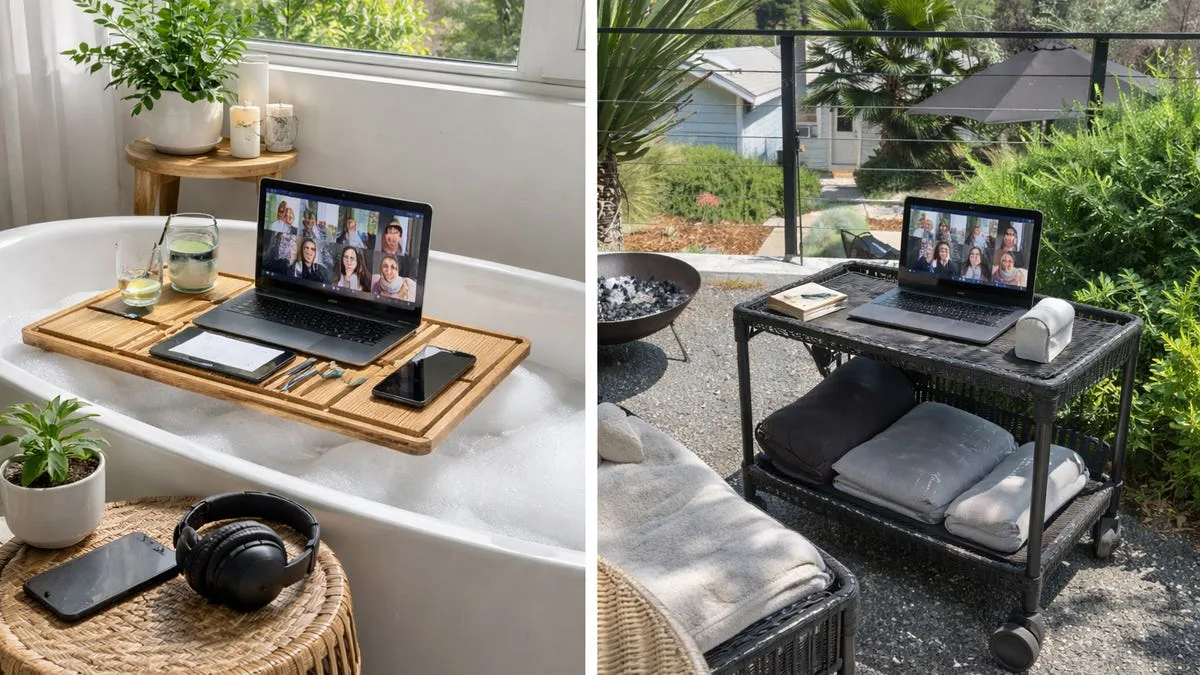
Backyard Setup: ChatGPT recommended sitting with greenery behind you for professional video call aesthetics and using a shade umbrella to prevent screen glare. Gemini suggested an all-terrain rolling desk for flexibility and easy repositioning throughout the day.
Bathroom Setup: ChatGPT recommended a lightweight, waterproof folding laptop table with adjustable leg height and angles. It also suggested a silicone keyboard cover to protect against steam and a waterproof phone pouch for device protection. Critically, ChatGPT advised proper camera positioning during video calls to avoid unflattering angles - a detail that prevents embarrassing "conference call in a soup" moments.
Why AI-Designed Workspaces Work Better
AI tools analyze your specific space, lighting, and work habits to generate personalized recommendations rather than generic advice. Claude, ChatGPT, and Gemini each bring different strengths: Claude excels at identifying overlooked essentials, ChatGPT provides visual mockups and creative solutions, and Gemini focuses on ergonomic and practical considerations.
By uploading photos and describing your work style, you receive tailored equipment lists, furniture suggestions, and layout recommendations that maximize productivity while fitting your actual living situation. This approach eliminates guesswork and helps you invest in gear that genuinely improves your remote work experience across multiple locations in your home.
This article was written by AI from reporting by cnet.com.