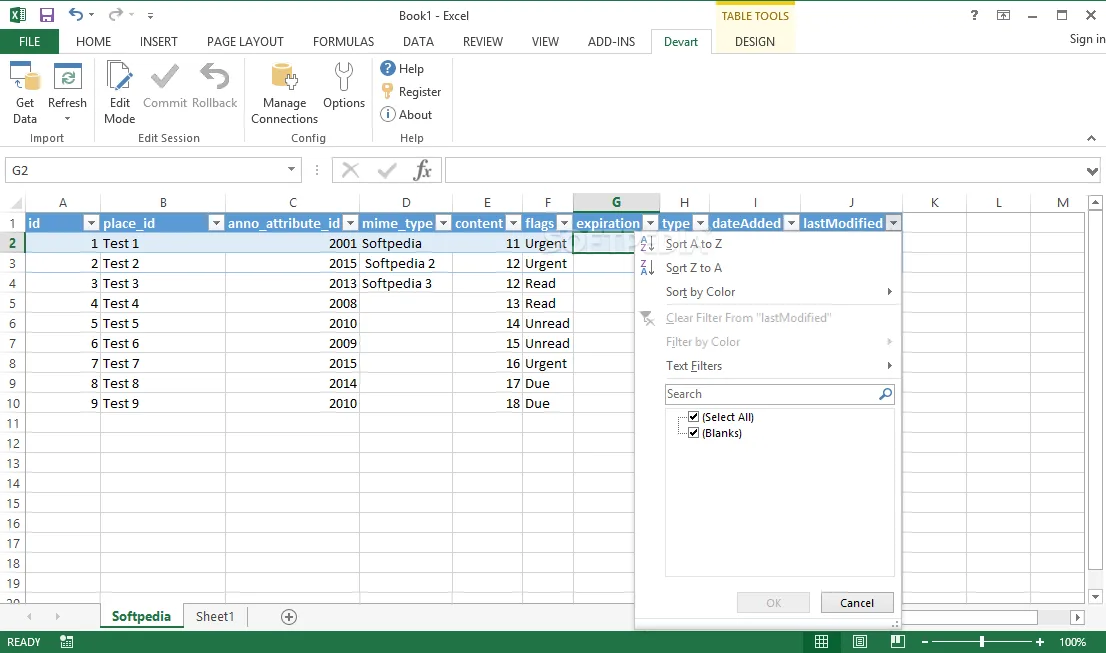
Moving live data from complex databases or cloud CRMs into Microsoft Excel often requires tedious manual exports or complex API scripts. The newly updated Devart Excel Add-ins 3.1.70 eliminates this friction by allowing users to directly import, map, and edit database tables within their active worksheets. The plug-in acts as a direct bridge between Excel and external data environments, maintaining the original table structure during migration.
Through a wizard-driven interface, users can configure database encoding algorithms and date/time formats before executing the import. This ensures that data integrity is maintained regardless of the source platform's specific formatting requirements.
Supported Databases and CRMs
The add-in supports a wide array of enterprise environments, ensuring compatibility with the most common data management programs. Supported platforms include:
- Relational Databases: DB2, MySQL, Oracle, PostgreSQL, SQL Server, and SQLite.
- Cloud CRMs: Microsoft Dynamics CRM, Salesforce, SugarCRM, and Zoho CRM.
How to Import and Edit Database Data
Devart simplifies the data migration process into a few actionable steps, giving users granular control over how information is displayed and modified.
- Connect and Map: Establish the connection using your platform login credentials. Once connected, select the desired table and map the necessary fields. Advanced users can also view and modify this association through a custom SQL query.
- Preview and Import: The wizard displays a structural preview of the data before finalizing the import. Users can choose to append the information to the current sheet or create a new one, preserving all columns, headers, and formatting.
- Enable Edit Mode: By activating Edit Mode, users can append or modify database information directly from Excel. The add-in uses color-coded cells to highlight modified data or flag erroneous fields, making bulk edits visually intuitive.
The Write-Back Advantage
While Excel's native Power Query excels at pulling data in, Devart’s true value lies in its bidirectional Edit Mode. The ability to modify a cell in Excel and have that change reflect back in a Salesforce or PostgreSQL database transforms the spreadsheet from a static reporting tool into a lightweight database management client. For data analysts and sales teams, this reduces the need to constantly switch between SQL managers, CRM dashboards, and spreadsheets, significantly cutting down on data entry errors and saving hours of manual synchronization.
This article was written by AI from reporting by win.softpedia.com.